I am fascinated by systems. I would not say I “fix” them so much as I need to understand the sum of their parts. What broke? Can I break it deliberately to expose a weakness I can fortify? What can be saved, and how creatively can I save it without compromising its security posture?
The current lab architecture is documented on Networking; this page focuses on the machines, storage, recovery work, and operating-system decisions beneath it.
Current systems
- NucNano: Dedicated Proxmox virtualization host.
- Nuc Sr.: Bare-metal Kali Linux and Windows 11 Pro system, with each operating system installed on a separate physical drive.
- MacBook Pro: Primary administration and development workstation.
- Dell Premium 16: Windows system reserved for professional and school environments.
- Dell OptiPlex 7020 Tower: Professional Windows desktop and current rebuild platform.
Storage failure and recovery
The Proxmox host's internal NVMe storage path began producing repeatable read errors during an emergency backup of the Windows Server 2025 domain controller. Six other virtual machines completed backups to tested external storage, while both the conventional backup and a direct disk conversion failed at the same region of the DC01 virtual disk. Kernel logs confirmed critical medium errors at the block layer.
I used ddrescue with a persistent mapfile to recover the readable data before retrying the damaged regions. The final image contained 61,440 unreadable bytes across four physical ranges. Filesystem analysis mapped the damage to three Windows files: lsasrv.dll, MrmCoreR.dll, and qevbda.sys. Those files were repaired from trusted Windows installation media.
Recovery was validated beyond a successful boot. Active Directory Domain Services, DNS, Netlogon, DFS Replication, and related services were running; SYSVOL reached the normal state; domain-controller advertising and service tests passed; and the server completed a clean disk-only boot with networking restored. A validated rollback snapshot was retained after recovery.
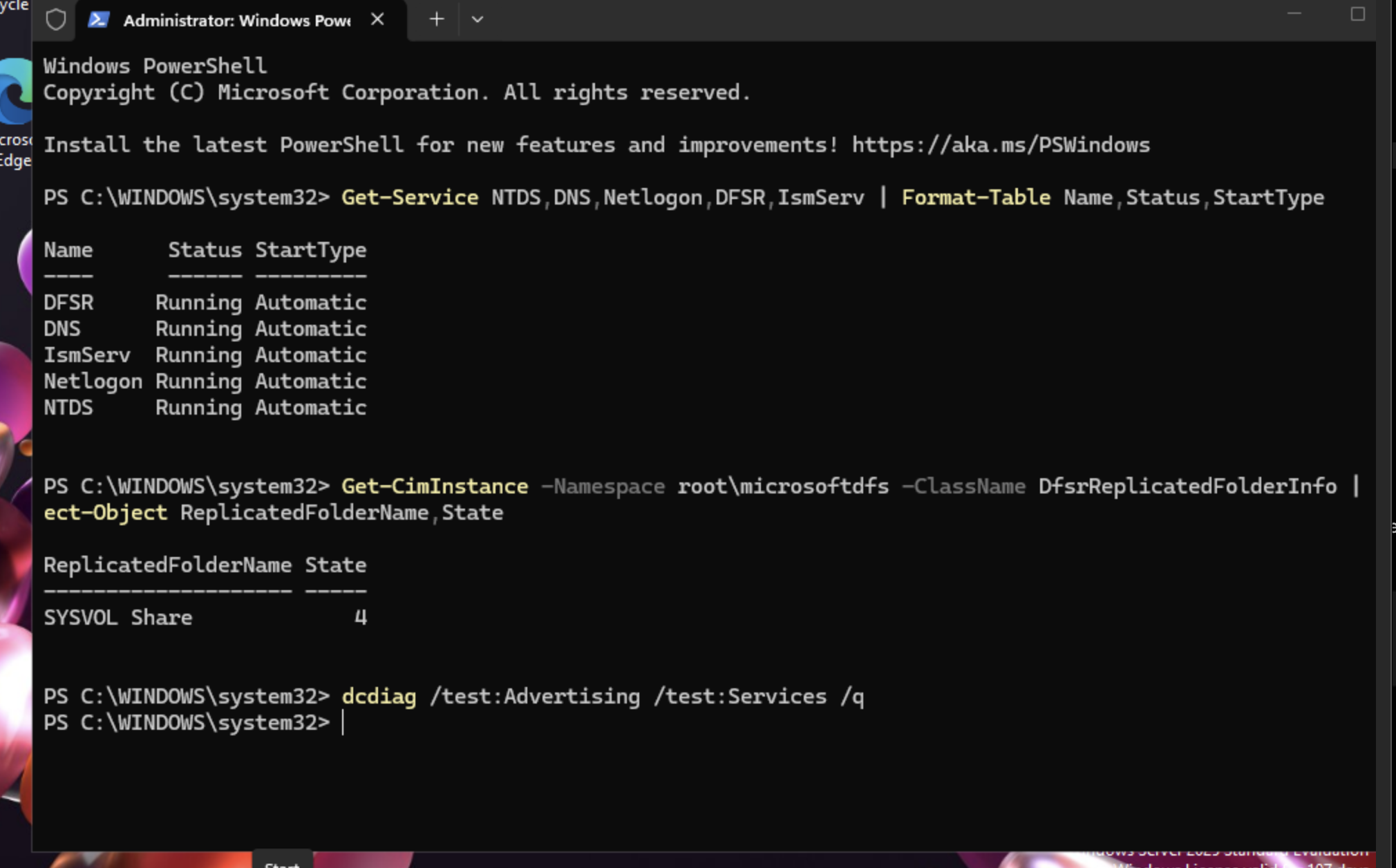
Post-recovery validation: required domain-controller services running, SYSVOL in state 4, and dcdiag advertising and services tests completed without reported errors.
Rebuilds and endpoint systems
The Dell OptiPlex 7020 was fully disassembled, cleaned, reassembled, and upgraded with additional memory and NVMe storage. BIOS and firmware settings were reviewed before Windows installation and system validation. It now serves as a professional Windows endpoint.
Legacy systems work
These are separate builds and recovery projects. Detailed case studies will be added only after the original notes, hardware identities, and photographs have been reconciled.
- Samsung Series 7 all-in-one: Restored touchscreen operation after a Windows upgrade disrupted the original driver support.
- Asus EeeBox: Repurposed low-power hardware with Debian Linux.
- Acer Aspire: Configured unsupported laptop hardware to run macOS.
- Asus EeePC: Completed and photographed a separate teardown and rebuild.
- CyberPowerPC: Assembled and configured a custom desktop from individual components.
Systems approach
I use and care for hardware for as long as I can do so safely, securely, and reliably. My collection of technology beyond that point is vast and reserved for rainy-day projects. I thrive on the hunt for a different operating system, driver, cable, or adapter I already own. I let the machine tell me when its time is up.