One audit log was more than twelve times larger than the rest. It contained 99 records filled with impossible timestamps, worldwide regions, and dates spanning several decades. Those fields reconstructed a Windows x64 payload four bytes at a time.
| Event | Hack The Box Cyber Apocalypse 2026 |
| Category | Reversing |
| Difficulty | Hard |
| Points | 975 |
| Outcome | Solved |
The assignment
The scenario described an audit utility compromised by a contractor who made its reports say exactly what the compliance office wanted to hear. The archive contained a Windows executable and 33 replication logs.
The objective was to determine what the utility checked, identify the contractor's hidden addition, and recover the proof from the resulting payload.
I started with the logs. Reverse engineering goes much faster when I understand normal before interpreting abnormal.
One clear black sheep
I inventoried the archive, recorded the executable's digest, and sorted the logs by size:
cd ~/Downloads/rev_CorpSyncAudit

file CorpSyncAudit.exe
sha256sum CorpSyncAudit.exe
find logs -type f -printf '%8s  %f\n' |
sort -n |
tail -8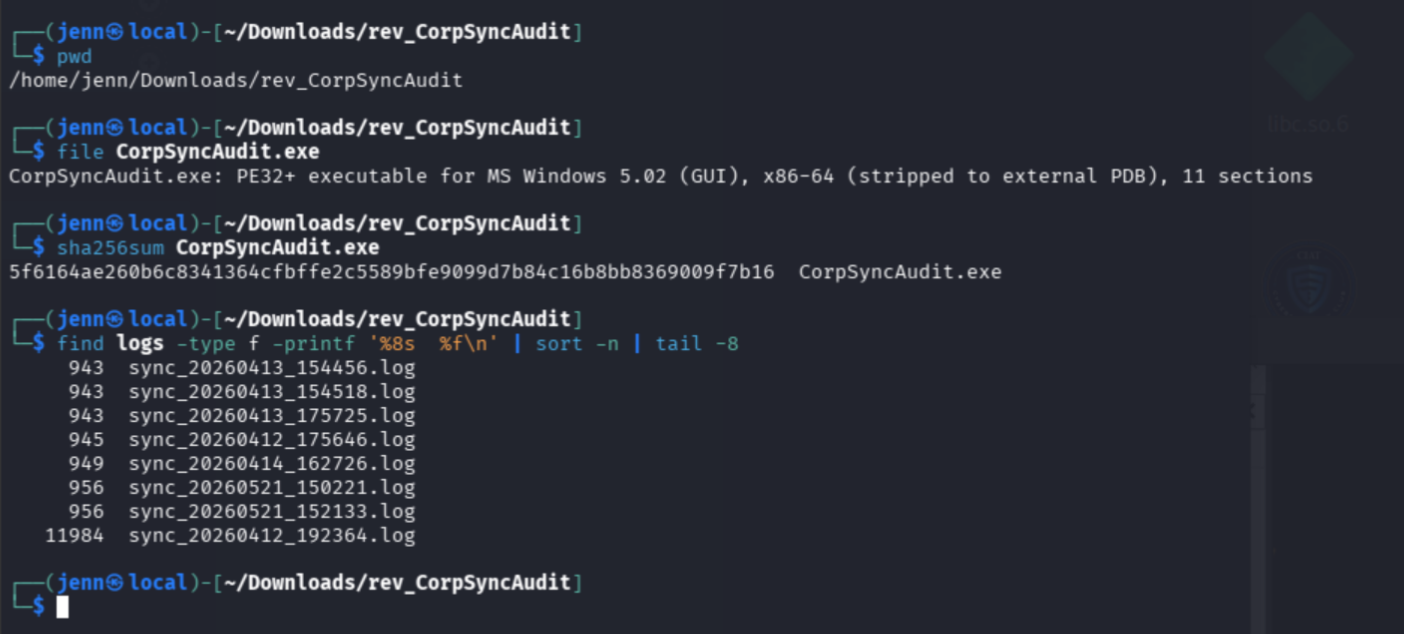
In this lovely ZIP, we had a 414,720-byte executable and 33 audit logs. Thirty-two logs clustered around 933 to 956 bytes. sync_20260412_192364.log sat by itself at 11,984 bytes.
The challenge card emphasized misleading audit logs, making the black sheep our most efficient evidence-based starting point. Its size did not tell us why it was different, so I compared it with sync_20260412_192334.log, created 30 seconds earlier:
sed -n '1,80p' logs/sync_20260412_192334.log
sed -n '1,120p' logs/sync_20260412_192364.log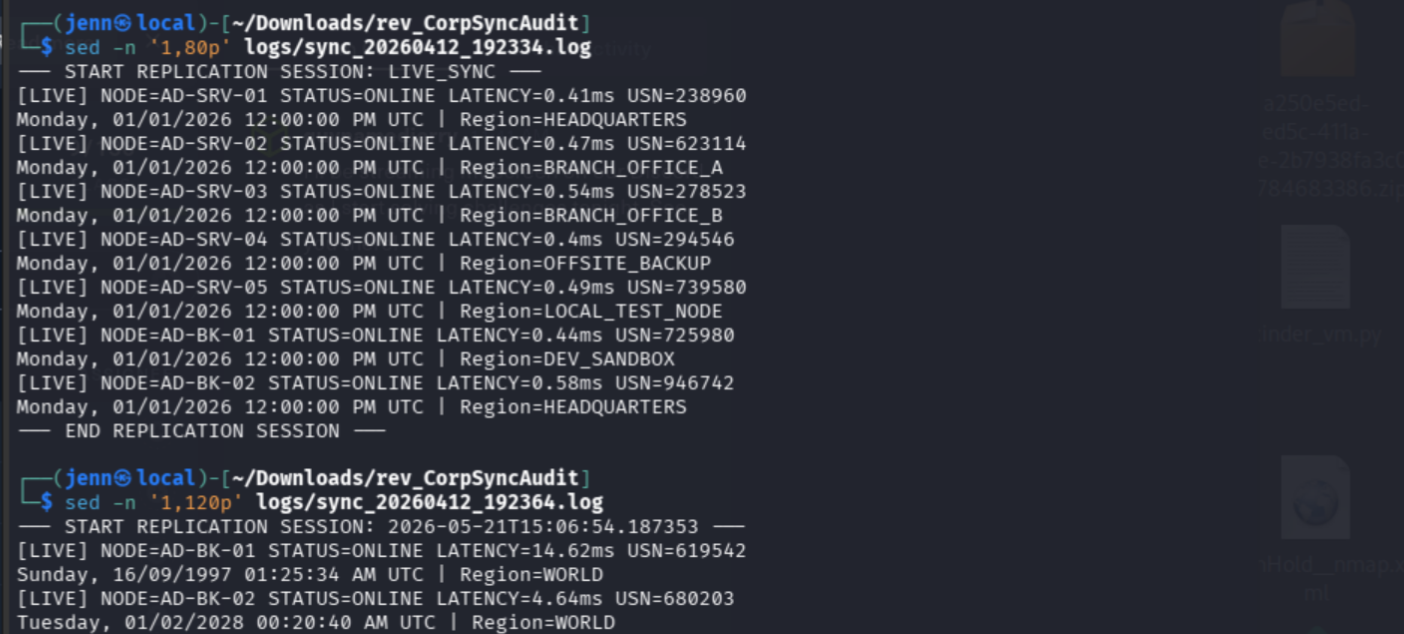
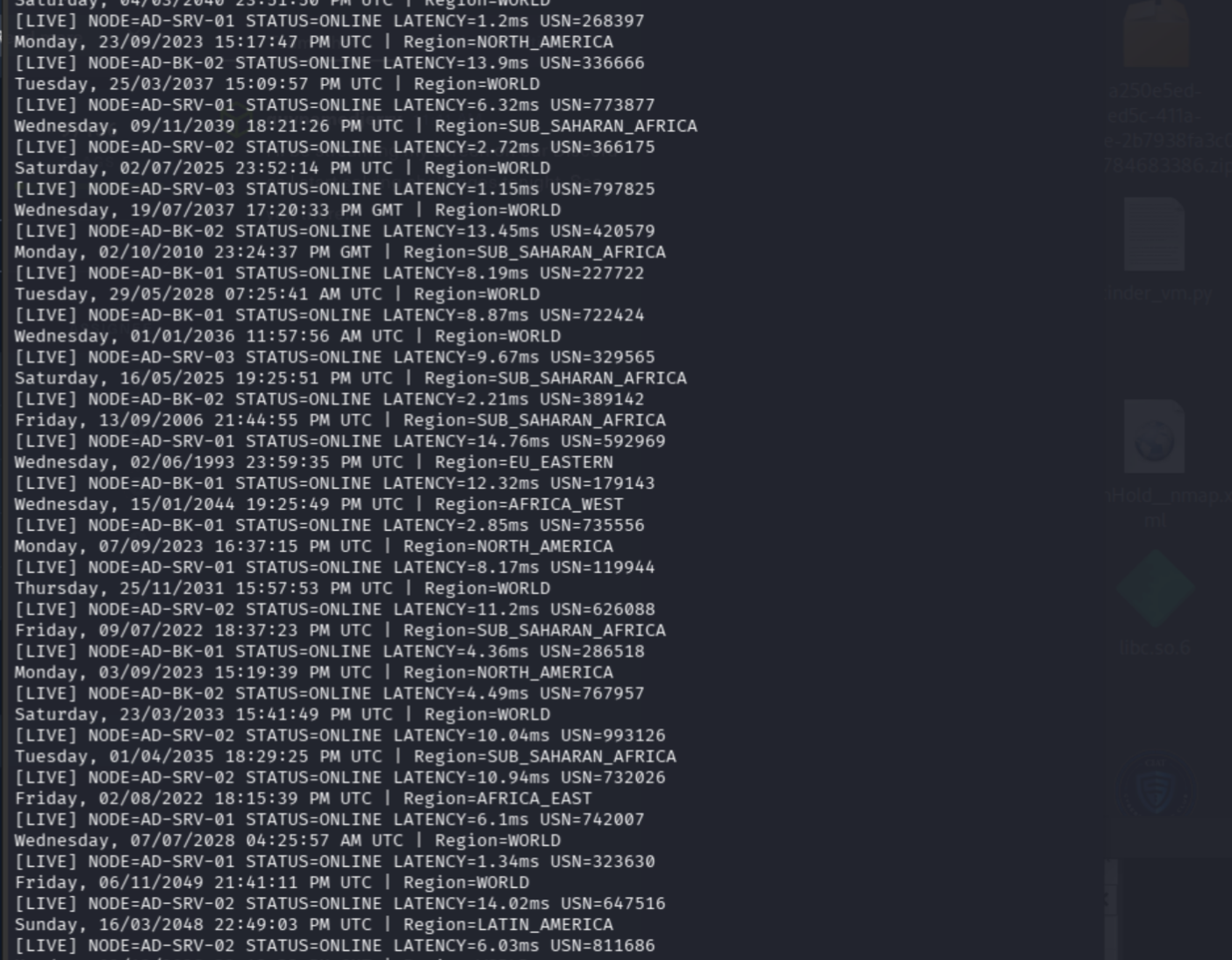
The contrast was immediate:
| Baseline log | Black sheep |
| Seven internal nodes, each reported once. | The same nodes repeated throughout the file. |
Internal regions such as HEADQUARTERS. | Worldwide regions such as RUSSIA, OCEANIA, and EAST_ASIA. |
| One consistent timestamp. | Dates ranging from the 1990s through the 2040s. |
| Latency below 1 ms. | Latency reaching roughly 15 ms. |
The filename said April 12, while the session header said May 21. Entries such as 14:13:53 PM mixed 24-hour time with AM/PM notation. The fields could have been encoded data or generated cover. I needed the full boundaries before deciding.
wc -l \
  logs/sync_20260412_192334.log \
  logs/sync_20260412_192364.log

tail -30 logs/sync_20260412_192364.log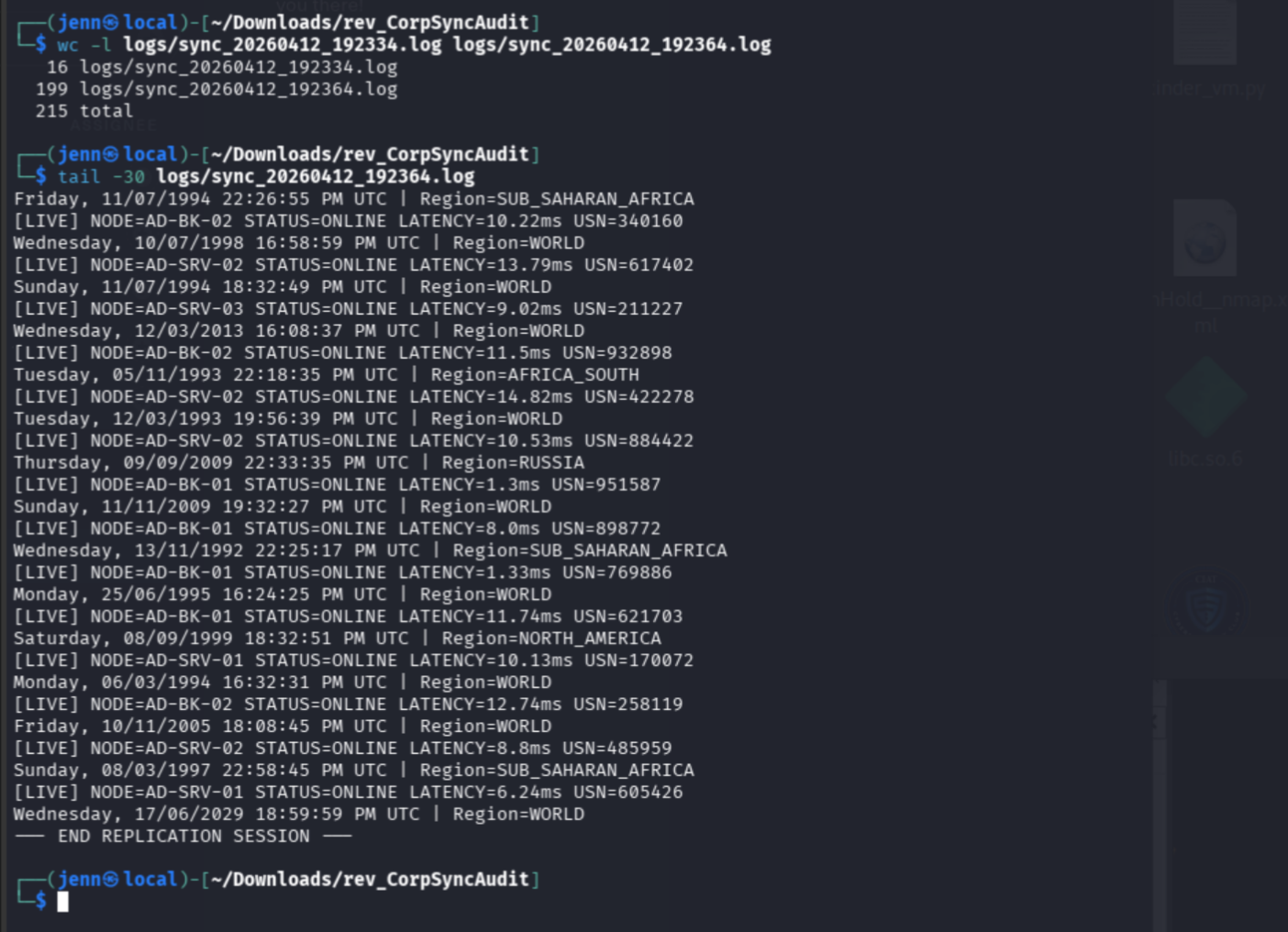
There was no payload appended to the end. The 199 returned by wc -l could also mean the final line lacked a newline, so I counted logical records:
awk '
/^\[LIVE\]/ { live++ }
/Region=/    { region++ }
END {
  print "logical_lines=" NR,
        "LIVE_records=" live,
        "Region_records=" region
}
' logs/sync_20260412_192364.log
The black sheep contained exactly 99 complete records:
logical_lines=200 LIVE_records=99 Region_records=99That gave us one session header, 99 [LIVE] lines, 99 corresponding region lines, one session terminator, and a partridge in a pair tree.
Choosing the reversing path
file identified the client as:
PE32+ executable for MS Windows 5.02 (GUI), x86-64I used rabin2 to check its metadata and linked libraries:
rabin2 -I CorpSyncAudit.exe
rabin2 -l CorpSyncAudit.exe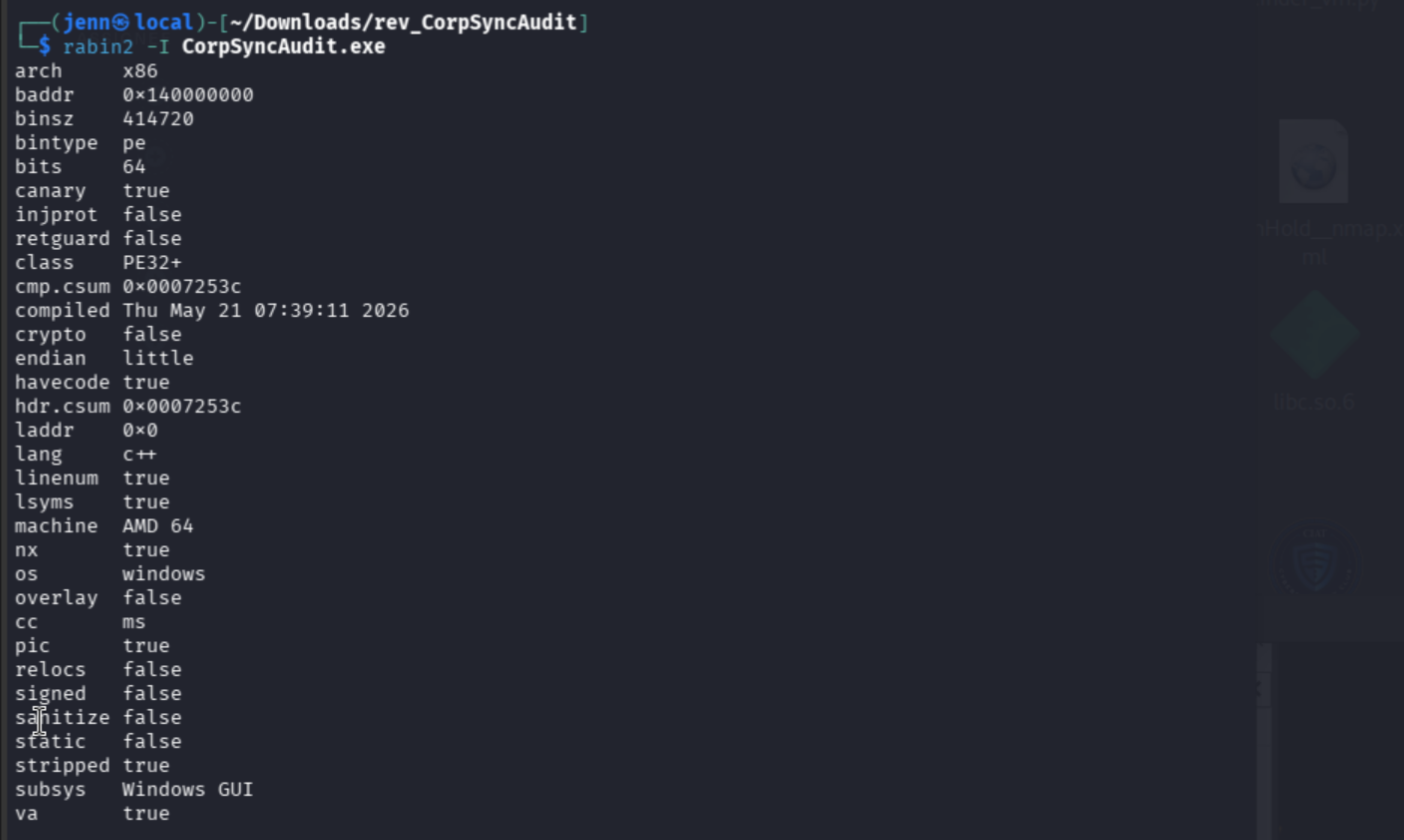
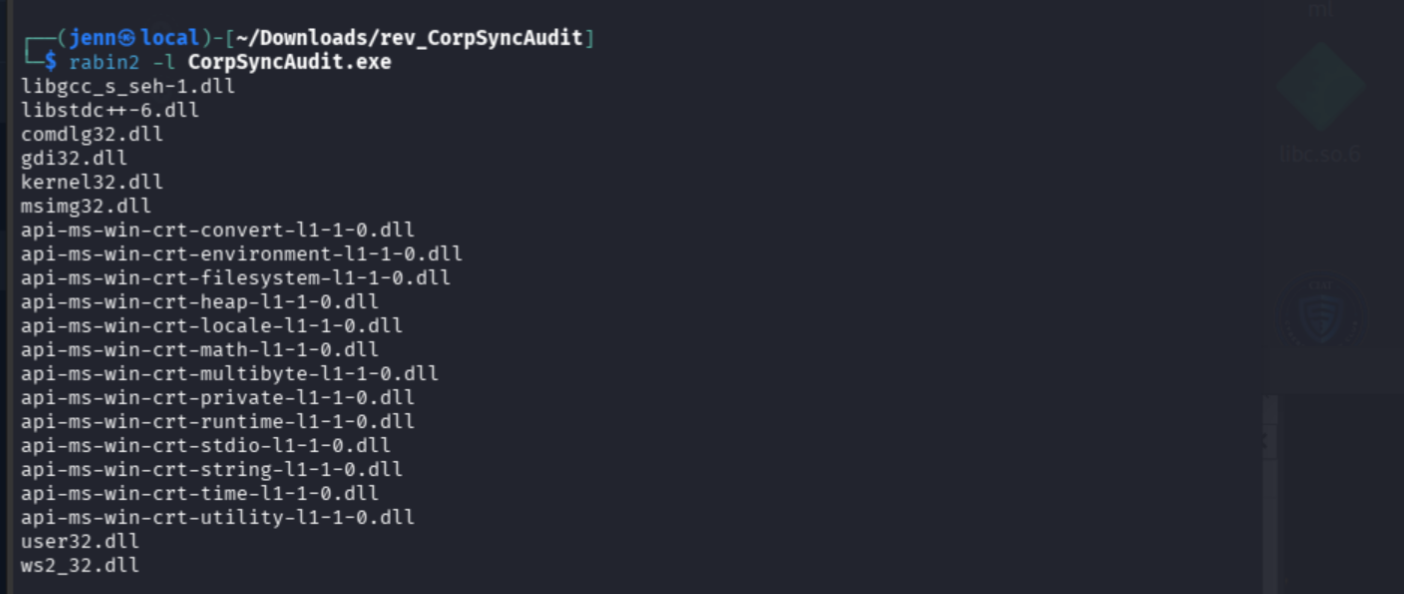
The results established a native 64-bit C++ Windows GUI application, likely built with MinGW/GCC and stripped of local symbols. WS2_32.dll supplied Windows networking, while the absence of WinHTTP-style imports pointed toward a custom TCP protocol.
The recorded compilation date was May 21, 2026. That matched the anomalous session header despite the April filename.
I filtered the imports for networking and execution-related capabilities:
rabin2 -i CorpSyncAudit.exe |
grep -Ei \
  'socket|connect|send|recv|getaddrinfo|WSA|CreateFile|ReadFile|WriteFile|CreateProcess|ShellExecute|WinHttp|Internet|Crypt|BCrypt|Reg'
The client imported socket, connect, send, and recv. I spawned the Docker service and made a passive five-second connection:
timeout 5 nc TARGET PORT | hexdump -C
Exit status 124 meant timeout ended the connection. The empty hexadecimal output meant the server sent zero bytes. Aha. The client had to speak first.
Following Winsock into the protocol
In Ghidra's Symbol Tree, I followed:
Imports
→ WS2_32.DLL
→ connect
→ References
→ Show References To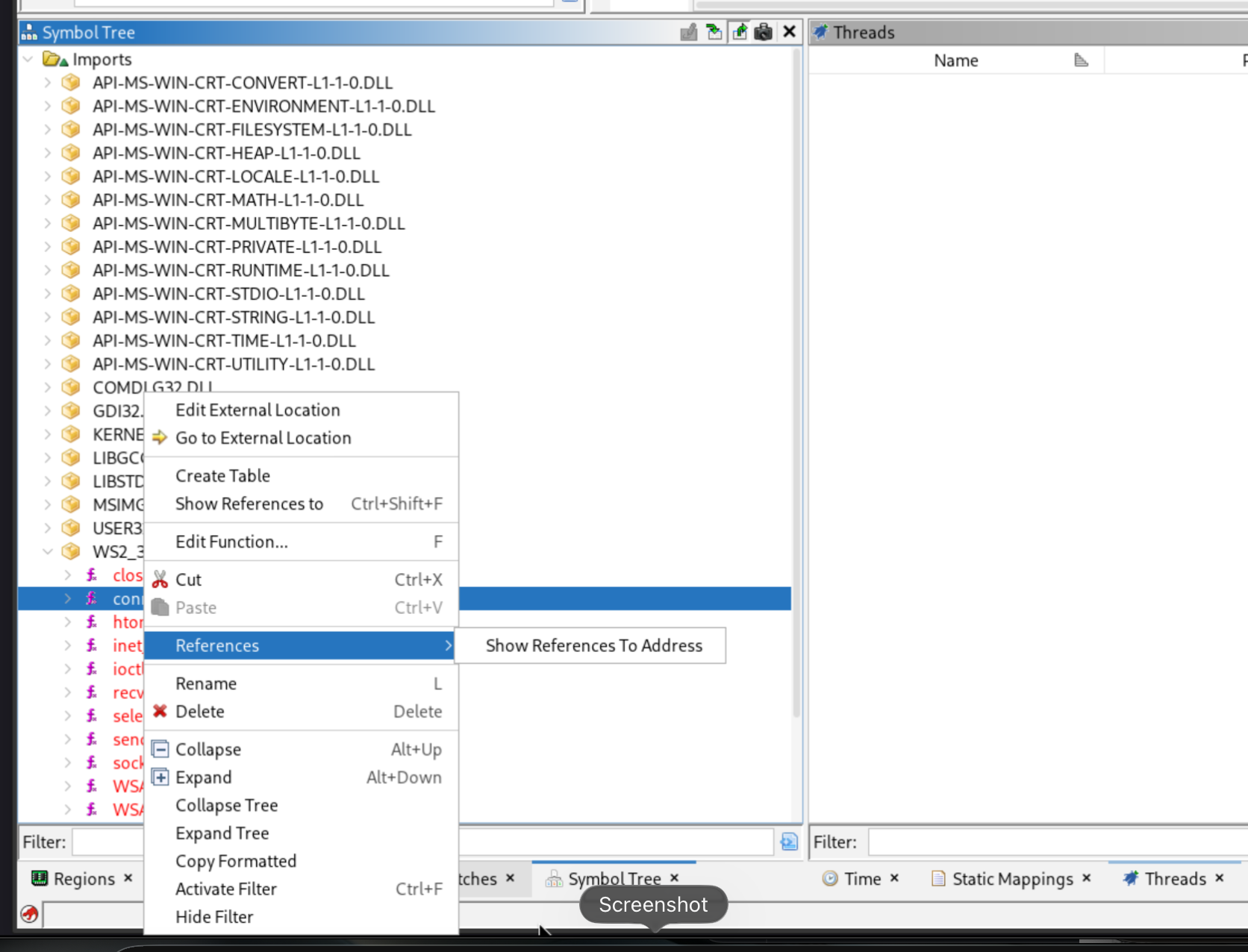
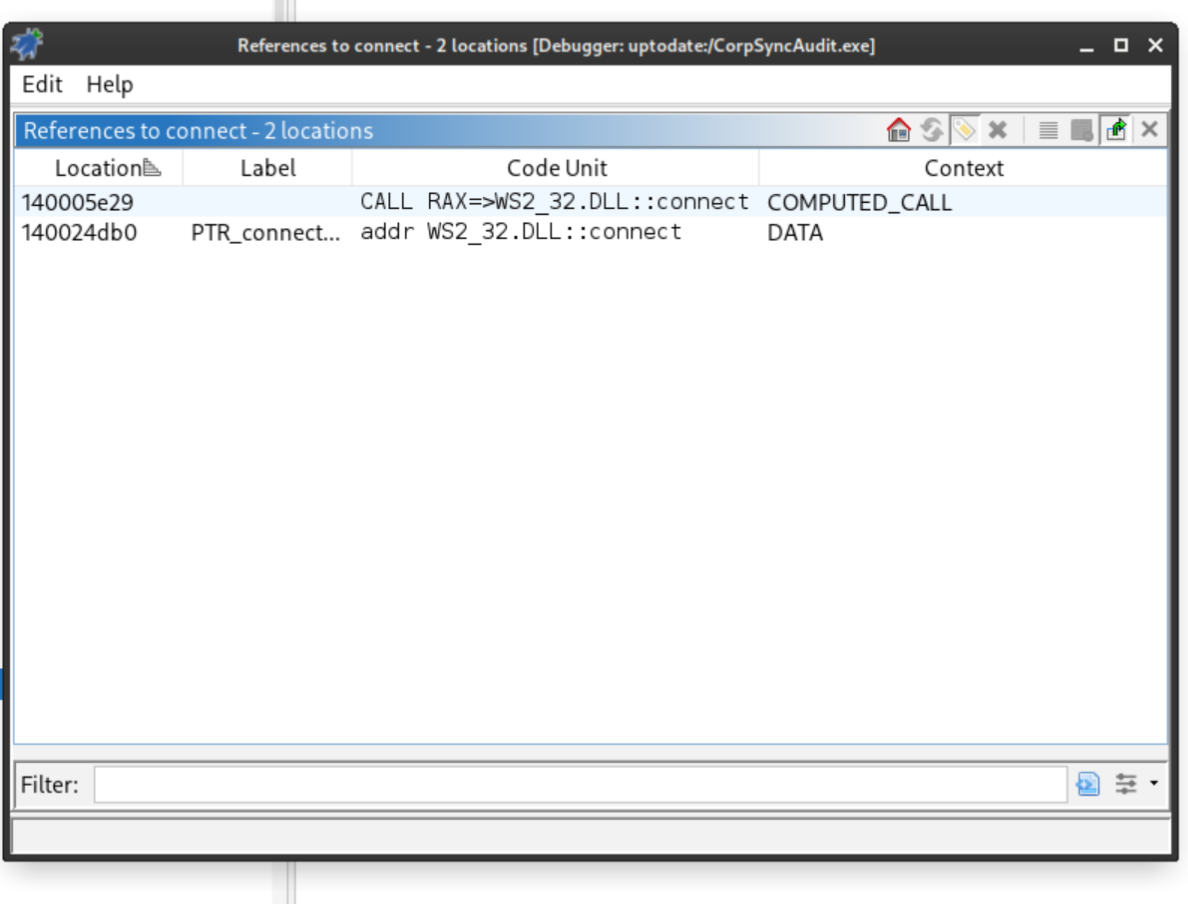
The Import Address Table pointer was not useful. The call site at 0x140005e29 was.
Its surrounding function:
- Created an IPv4 TCP socket.
- Connected to
127.0.0.1:4445. - Switched to nonblocking mode.
- Waited up to three seconds with
select. - Constructed data from
0x14001d3e8. - Sent ten bytes.
- Read until the response contained a newline.
- Returned the response to the GUI.
The external HTB port routed traffic to the application's localhost service. The passive connection failed because the service was waiting for its ten-byte request.
The first request was wrong
The data stored at 0x14001d3e8 appeared to be:
cc 09 28 63 c0 04 23 73 cb 5a 00The client constructed all 11 bytes but sent only the first ten. I reproduced those ten bytes:
printf '\xcc\x09\x28\x63\xc0\x04\x23\x73\xcb\x5a' |
nc -q 2 TARGET PORT |
hexdump -C
Nope. We were missing something.
The stored constant passed through FUN_1400016c0 before reaching send(). That function initialized the four-byte key 9f 50 66 20 and XORed each byte with the repeating key:
decoded[i] = stored[i] XOR key[i mod 4]I reproduced the transformation:
python3 -c '
data = bytes.fromhex("cc092863c0042373cb5a")
key  = bytes.fromhex("9f506620")
print(bytes(b ^ key[i % 4] for i, b in enumerate(data)))
'
Bam:
SYNC_TEST\nSYNC_TEST supplied nine bytes, and the newline supplied the tenth. Sending the decoded request produced a newline-terminated JSON report:
printf 'SYNC_TEST\n' |
nc -q 2 TARGET PORT |
hexdump -C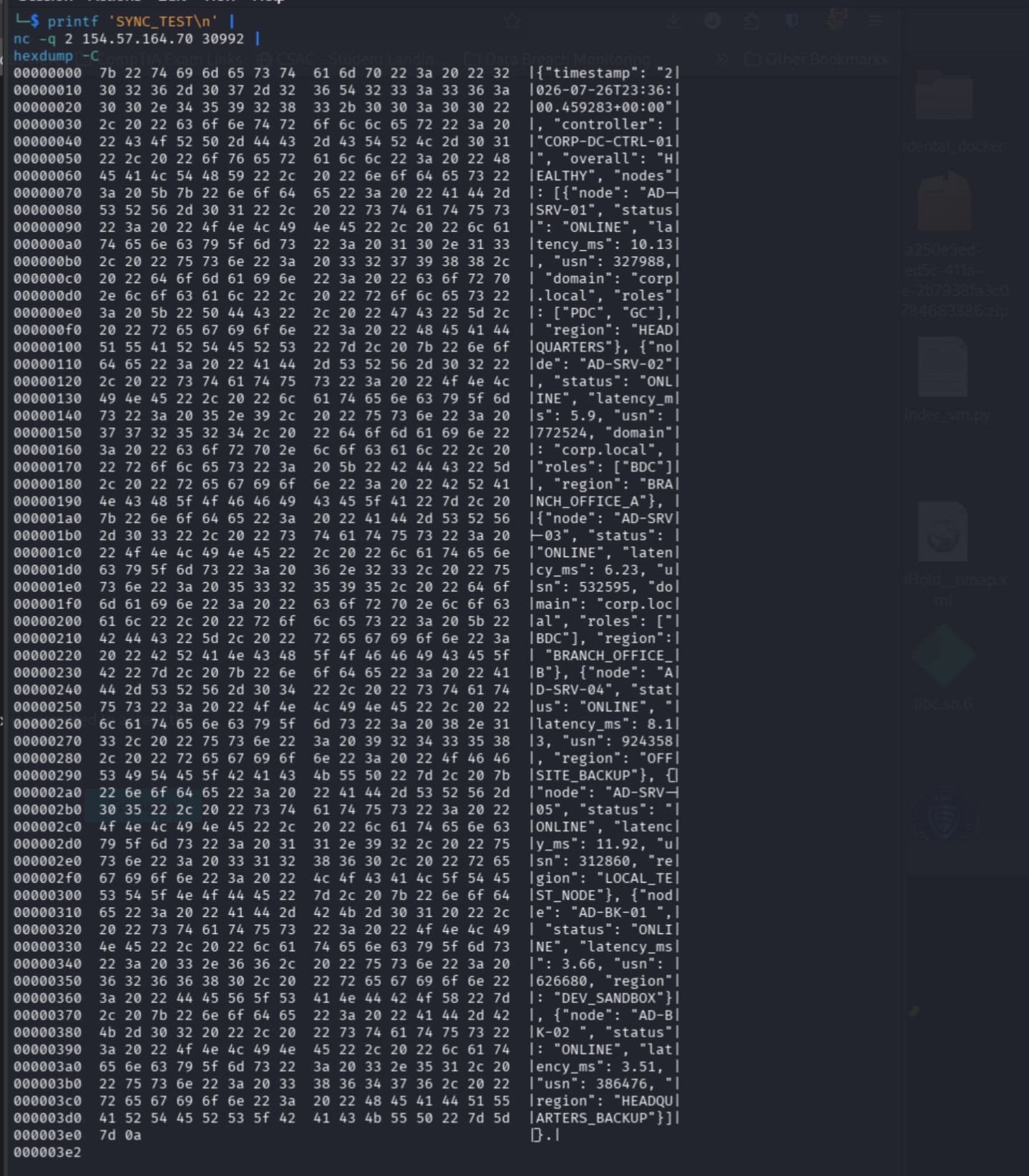
The response described seven healthy internal nodes. We still did not have the flag, but we had the protocol and a baseline object to trace through the client.
The audit client rewrote its evidence
Searching Ghidra for the Windows message value 0x401 led from the successful network response to FUN_14000402d.
The function parsed the JSON and wrote a local audit report. It replaced the server timestamp with the current local time and replaced latency with a randomized value between 0.40 and 0.59 ms. Every saved result appeared consistently healthy because the client manufactured the visible evidence.
But wait, there was more.
FUN_1400061b5 opened a file-selection dialog, displayed the selected path, cleared the previous result, and passed the chosen log to FUN_140003827.
The two paths now made sense:
| Function | Role |
FUN_14000402d | Generated sanitized audit logs from the live JSON response. |
FUN_140003827 | Processed an existing log selected by the user. |
The second function did much more than validate formatting. It hashed each region name, searched a 32-entry table for the hash, treated the table index as five control bits, transformed timestamp fields, packed them into a 32-bit word, and recovered four output bytes per record.
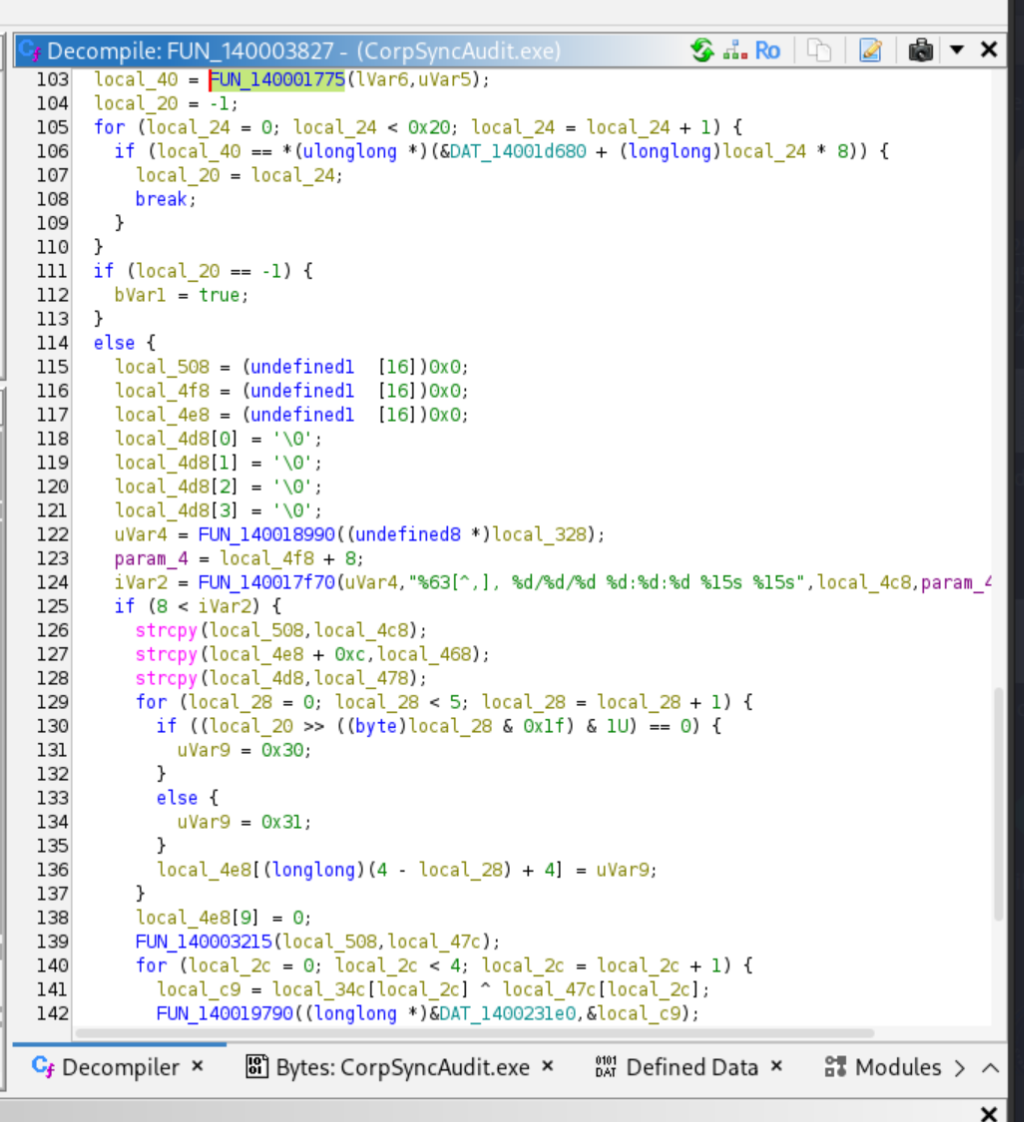
The resulting buffer passed to a routine that allocated memory in another Windows process, wrote the buffer, changed its protection, and created a remote thread:
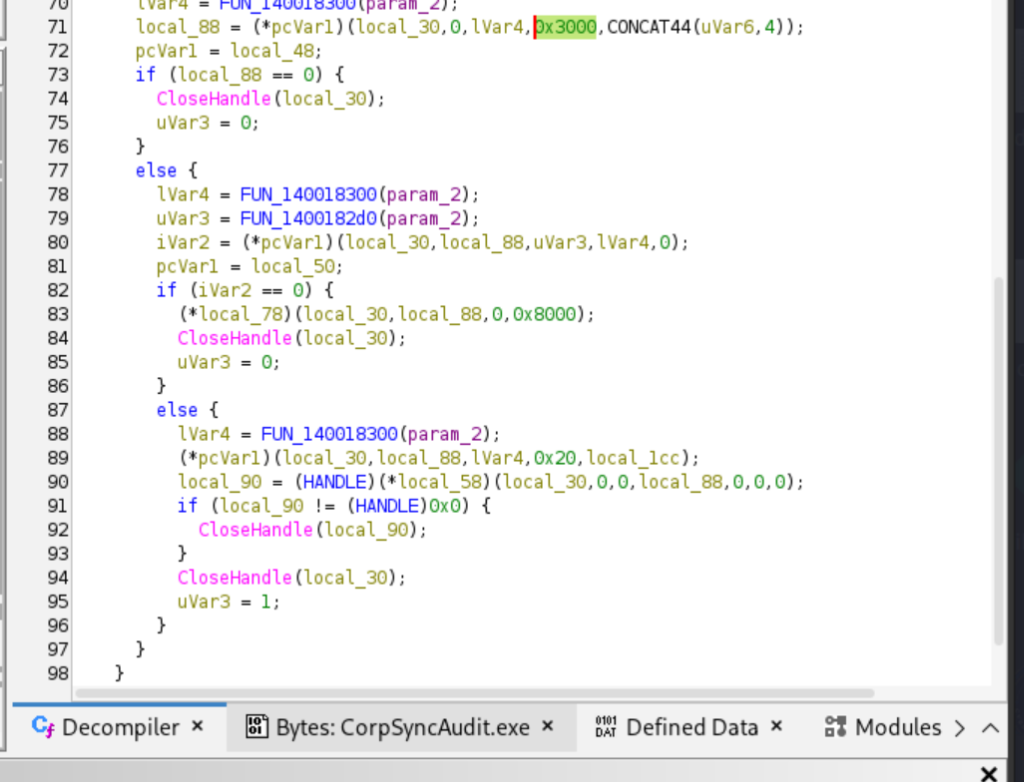
We had crossed from shamelessly dishonest audit reporting into payload loading.
Recovering the five-bit region values
I extracted the 32-entry hash table and listed the regions used in the black sheep:
r2 -q \
  -c 'pxq 256 @ 0x14001d680' \
  -c q \
  CorpSyncAudit.exe

sed -n 's/.*Region=//p' \
  logs/sync_20260412_192364.log |
sort -u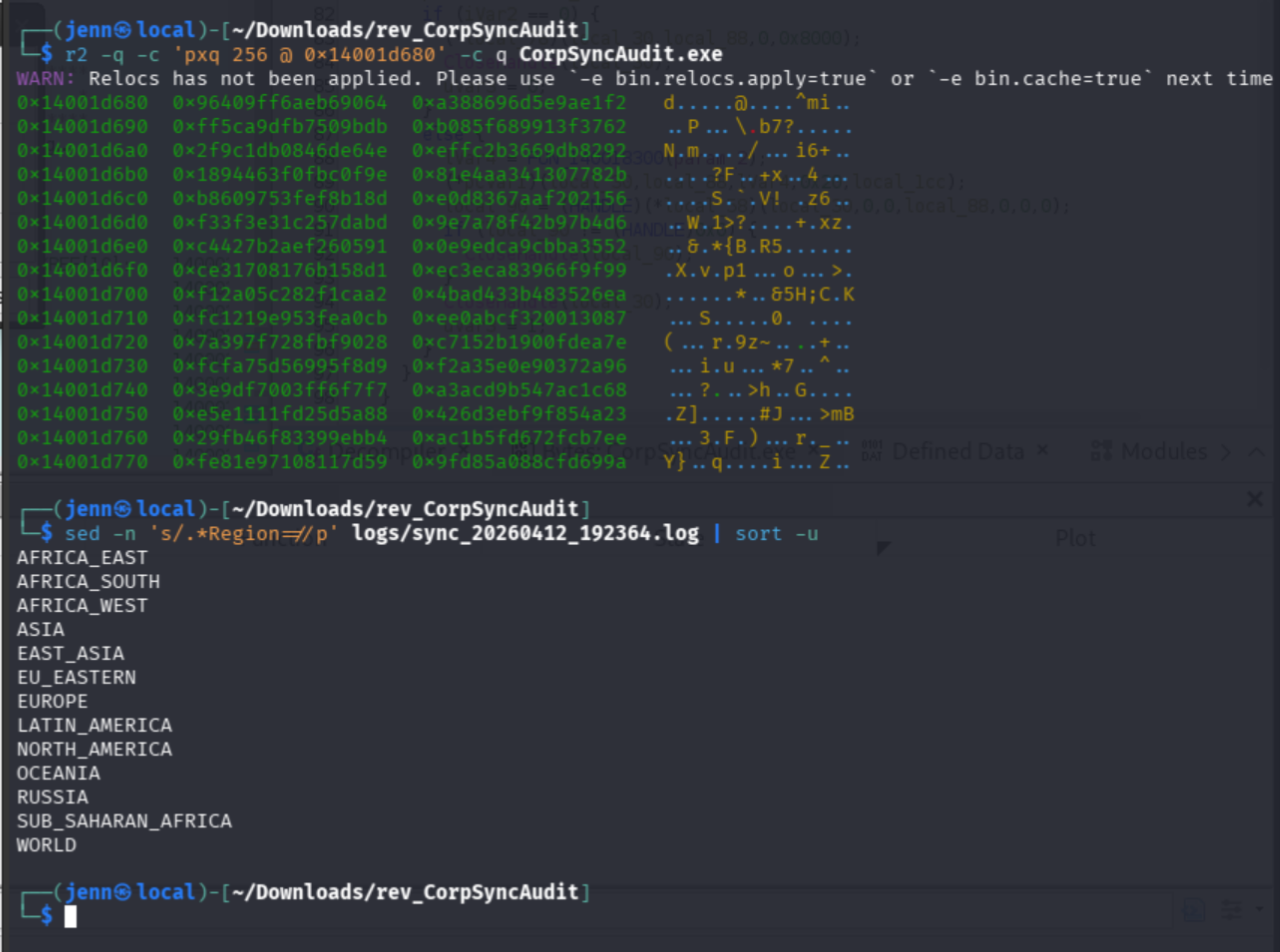
I reproduced the program's case-normalized, rotated 64-bit hash and located each observed region in the table:
| Region | Index | Five-bit value |
WORLD | 0 | 00000 |
NORTH_AMERICA | 1 | 00001 |
LATIN_AMERICA | 2 | 00010 |
EUROPE | 3 | 00011 |
EU_EASTERN | 4 | 00100 |
ASIA | 8 | 01000 |
EAST_ASIA | 9 | 01001 |
SUB_SAHARAN_AFRICA | 16 | 10000 |
AFRICA_EAST | 17 | 10001 |
AFRICA_WEST | 18 | 10010 |
AFRICA_SOUTH | 20 | 10100 |
RUSSIA | 21 | 10101 |
OCEANIA | 24 | 11000 |
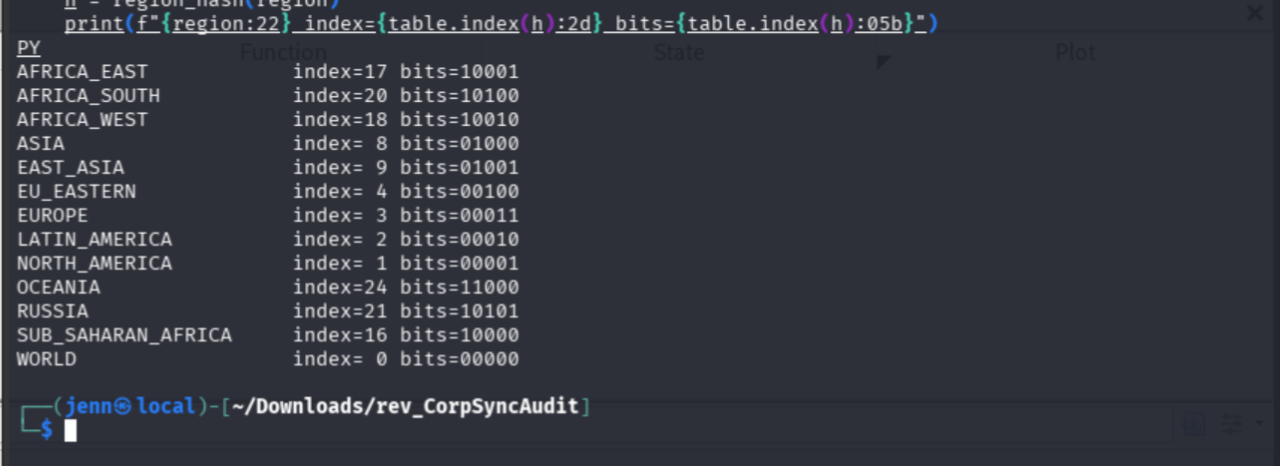
Each bit controlled one field transformation:
| Bit | Field | XOR value |
0x10 | Hour | 0x0c |
0x08 | Minute | 0x1e |
0x04 | Second | 0x1e |
0x02 | Day | 0x10 |
0x01 | Month | 0x06 |
The region name carried a compact five-bit instruction.
GMT activated another transformation
The parser recognized one obfuscated three-letter marker. I extracted it:
r2 -q \
  -c 'p8 3 @ 0x14001d257' \
  -c q \
  CorpSyncAudit.exe
XOR with the same string key produced:
d8 XOR 9f = G
1d XOR 50 = M
32 XOR 66 = T
Aha. GMT.
For GMT records, the parser redistributed the hour, minute, and second before applying the region-controlled XORs. It then packed the recovered fields:
hour   → bits 31..27
minute → bits 26..21
second → bits 20..15
day    → bits 14..10
month  → bits  9..6
year   → bits  5..0, stored as year - 1990
The last XOR used the weekday value and the recovered four-byte key f0 7e c6 a4.
Building corpse_sync.py
Perfect name for a shamelessly dishonest audit tool.
I implemented the recovered transformations in corpse_sync.py. The full decoder belongs on the site's Scripts page; this writeup preserves the logic and the evidence it supported.
The script:
- Matched timestamp and region records.
- Applied the GMT redistribution.
- Converted each region to its five-bit index.
- Reversed the conditional field XORs.
- Packed the six numeric fields into one 32-bit word.
- Applied the weekday value and four-byte key.
- Appended four recovered bytes per record.
I ran it against the anomalous log:
python3 corpse_sync.py \
  logs/sync_20260412_192364.log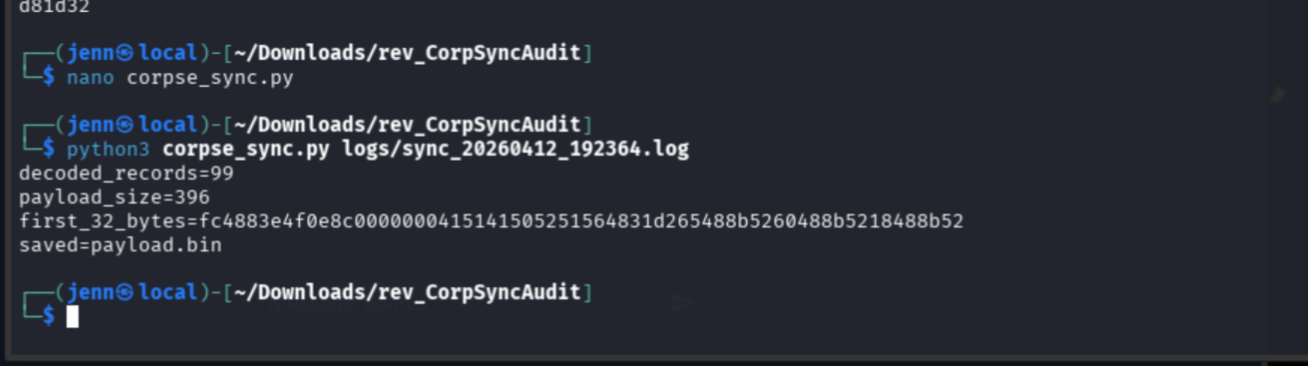
All 99 records produced exactly 396 bytes:
decoded_records=99
payload_size=396
first_32_bytes=fc4883e4f0e8c0000000415141505251564831d265488b5260488b5218488b52
saved=payload.bin
The leading bytes matched a recognizable Windows x64 shellcode prologue. I did not execute the recovered file.
Inspecting the payload safely
I used static string and hexadecimal inspection:
strings -a -t x -n 4 payload.bin
xxd payload.bin | tail -15
The contractor's persistence mechanism was sitting inside the payload. The embedded Windows command:
- Created a user named
backup_admin. - Assigned it a Base64-encoded password.
- Added it to the
Remote Desktop Userslocal group.
I decoded only the credential material:
printf '%s' 'REDACTED_BASE64_VALUE' |
base64 -d
echo
Nice try, shady contractor.
The decoded value matched the expected flag format:
HTB{REDACTED}
Four bytes per record
Each record encoded one 32-bit value. The timestamp supplied six numeric fields. The region selected five conditional XOR operations. The weekday and recovered key supplied the final mask.
region name
    ↓ hash-table index
five control bits
    ↓
alter hour, minute, second, day, and month
    ↓
pack the timestamp fields into 32 bits
    ↓
XOR the weekday value and four-byte key
    ↓
four payload bytes
Repeating the process 99 times yielded:
99 records × 4 bytes = 396 bytesThe impossible timestamps, regions, and weekdays were program state disguised as audit metadata.
Security impact
The client could falsify the records used to judge replication health. Its hidden parser reconstructed shellcode from those records and injected the recovered buffer into another process. The payload then created a local account and granted it Remote Desktop access.
The reporting client occupied both sides of the trust boundary: it collected the evidence and decided what the compliance office saw. Preserving server-originated telemetry outside that client would make the tampering visible. Binary signing, integrity checks, centralized append-only logging, and alerts for impossible dates or unexpected account changes would further reduce the attack surface.
Attribution
I performed the file triage, baseline comparison, protocol analysis, Ghidra tracing, hash-table recovery, decoder implementation, payload reconstruction, and static inspection described here. No teammate contribution is documented for this challenge.
AI supported my Ghidra learning, decompiler interpretation, transformation checks, and final organization. I executed the commands, examined the evidence, corrected the failed request, implemented the decoder, and validated the recovered payload. This followed the event rule permitting AI as a supporting tool.
Full attack chain
- Isolated the 11,984-byte outlier among 33 audit logs.
- Compared it with a near-time baseline and counted 99 anomalous records.
- Identified
CorpSyncAudit.exeas a native x64 Windows client. - Followed Winsock references and recovered the localhost TCP protocol.
- Corrected the failed raw-byte request and decoded
SYNC_TEST\n. - Traced the JSON response into sanitized log creation and hidden log parsing.
- Mapped region hashes to five-bit indices and reversed the timestamp packing.
- Decoded 99 records into a 396-byte Windows x64 payload.
- Inspected the payload statically and recovered the redacted proof.